Role recommendations help you identify and remove excess permissions from your
principals, improving your resources' security configurations.
## Overview of role recommendations
Role recommendations are generated by the IAM recommender. The
IAM recommender is one of the recommenders that
[Recommender](https://docs.cloud.google.com/recommender/docs.md.txt) offers.
Each role recommendation suggests that you remove or replace a role that gives
your principals excess permissions. At scale, these recommendations help you
enforce the principle of least privilege by ensuring that principals have only
the permissions that they actually need.
The IAM recommender identifies excess permissions using *policy
insights*. Policy insights are ML-based findings about a principal's permission
usage.
Some recommendations are also associated with *lateral movement insights* . These
insights identify roles that allow service accounts in one project to
impersonate service accounts in another project. For more information, see [How
lateral movement insights are generated](https://docs.cloud.google.com/policy-intelligence/docs/role-recommendations-overview#lateral-movement-insights).
## How policy insights are generated
Policy insights highlight the permissions in a principal's roles that the
principal isn't using.
The IAM recommender generates policy insights by comparing a
principal's total number of permissions with the permissions that the principal
used in the last 90 days. If the role was granted fewer than
90 days ago, the IAM recommender looks at the
principal's permission usage in the time since the principal was granted the
role.
There are a few ways in which a principal can use a permission:
- *Directly*, by calling an API that requires the permission
For example, the [`roles.list` method](https://docs.cloud.google.com/iam/docs/reference/rest/v1/roles/list.md.txt) in the
IAM REST API requires the `iam.roles.list` permission.
When you call the `roles.list` method, you use the `iam.roles.list`
permission.
Similarly, when you call the `testIamPermissions` method for a resource, you
effectively use all of the permissions that you are testing.
- *Indirectly*, by using the Google Cloud console to work with Google Cloud
resources
For example, in the Google Cloud console, you can edit a Compute Engine
virtual machine (VM) instance, which requires different permissions based on
which settings you change. However, the Google Cloud console also displays
the existing settings, which requires the `compute.instances.get`
permission.
As a result, when you edit a VM instance in the Google Cloud console, you
use the `compute.instances.get` permission.
To determine the permissions that the principal used, the
IAM recommender uses aggregated IAM access data. To
learn how to export the data that IAM recommender uses for these
insights, see [Export data for role recommendations](https://docs.cloud.google.com/policy-intelligence/docs/export-role-recommendations-data.md.txt).
The IAM recommender also uses machine learning to identify permissions
in a principal's current role that the principal is likely to need in the
future, even if the principal did not use those permissions recently. For more
information, see [Machine learning for policy insights](https://docs.cloud.google.com/policy-intelligence/docs/role-recommendations-overview.md.txt#ml) on this page.
Policy insights aren't generated for all IAM roles that are
granted to principals. For more information about why a role might not have a
policy insight, see [Availability](https://docs.cloud.google.com/policy-intelligence/docs/role-recommendations-overview.md.txt#availability) on this page.
To learn how to manage policy insights, see [Manage policy insights for
projects, folders, and organizations](https://docs.cloud.google.com/policy-intelligence/docs/policy-insights) or [Manage policy
insights for Cloud Storage buckets](https://docs.cloud.google.com/policy-intelligence/docs/policy-insights-buckets).
### Machine learning for policy insights
In some cases, a principal is likely to need certain permissions that are
included in their current roles, but that they haven't used recently. To
identify these permissions, the IAM recommender uses a machine learning
(ML) model when generating policy insights.
This machine learning model is trained on multiple sets of signals:
- **Common co-occurrence patterns in the observed history**: The fact that a
user used permission A, B, and C in the past provides a hint that A, B, and C
might be related in some way and that they are needed together to carry out a
task on Google Cloud. If the ML model observes this pattern frequently
enough, the next time a different user uses permission A and B, the model will
suggest that the user might need permission C as well.
- **Domain knowledge as encoded in the role definitions**: IAM
provides hundreds of different predefined roles that are service-specific. If
a predefined role contains a set of permissions, it is a strong
signal that those permissions should be granted together.
In addition to these signals, the model also uses
[word embedding](https://developers.google.com/machine-learning/crash-course/embeddings/video-lecture) to calculate how
semantically similar the permissions are. Semantically similar permissions will
be "close" to each other after embedding, and more likely to be granted
together. For example, `bigquery.datasets.get` and `bigquery.tables.list`
will be very close to each other after embedding.
All data used in the IAM recommender machine learning pipeline
has [*k*-anonymity](https://docs.cloud.google.com/sensitive-data-protection/docs/concepts-risk-analysis.md.txt#about-k-anonymity), meaning that individuals in
the anonymized data set cannot be re-identified. To achieve this level of
anonymity, we drop all personally identifiable information (PII) such as the
user ID related to each permission usage pattern. Then we drop all usage
patterns that do not show up frequently enough across Google Cloud. The
global model is trained on this anonymized data.
The global model can be further customized for each organization using
[federated learning](https://federated.withgoogle.com/), a machine learning
process that trains machine learning models without exporting data.
## How role recommendations are generated
If a policy insight indicates that a principal does not need all of the
permissions in their role, the IAM recommender assesses the role to
determine if it could be revoked, or if there is another role that's a better
fit. If the role can be revoked, the IAM recommender generates a role
recommendation to revoke the role. If there is another role that's a better fit,
the IAM recommender generates a role recommendation to replace the role
with a suggested role. This suggested role could be a
[new custom role](https://docs.cloud.google.com/policy-intelligence/docs/role-recommendations-overview.md.txt#custom-roles), an existing custom role, or one or more
[predefined roles](https://docs.cloud.google.com/iam/docs/understanding-roles). Except in the case of [recommendations for
service agents](https://docs.cloud.google.com/policy-intelligence/docs/role-recommendations-overview#service-agents), a role recommendation never suggests a
change that increases a principal's level of access.
Role recommendations are generated based on only IAM access
controls. They do not take into account other kinds of access controls, like
[access control lists (ACLs)](https://docs.cloud.google.com/storage/docs/access-control/lists.md.txt) and Kubernetes [role-based access
control (RBAC)](https://docs.cloud.google.com/kubernetes-engine/docs/how-to/role-based-access-control). If you use other types of access controls, take extra
care when you review your recommendations, and consider how those access
controls relate to your allow policies.
Additionally, role recommendations aren't generated for all IAM
roles that are granted to principals. For more information about why a role
might not have a role recommendation, see [Availability](https://docs.cloud.google.com/policy-intelligence/docs/role-recommendations-overview.md.txt#availability) on this
page.
### Observation period
A role recommendation's observation period is the number of days of
permission usage data that the recommendation is based on.
The maximum observation period for role recommendations is
90 days. This means that the IAM recommender uses,
at most, the most recent 90 days of permission usage data to
generate role recommendations.
The IAM recommender also doesn't start generating role recommendations
until it has a certain number of days of permission usage data. This duration
is called the *minimum observation period* . By default, the minimum
observation period is 90 days, but, for project-level role
recommendations, you can manually set it to 30 days or 60 days. For details, see
[Configure role recommendation generation](https://docs.cloud.google.com/policy-intelligence/docs/configure-role-recommendations.md.txt). **If you set the
minimum observation period to fewer than 90 days, you'll get
recommendations sooner, but the accuracy of the recommendations might be
affected.**
If it's been longer than the minimum observation period but less than
90 days since the role was granted, the observation period
is the length of time since the role was granted.
### New custom roles in role recommendations
When the IAM recommender suggests replacements for a role,
it always suggests an existing custom role, or one or more predefined
roles, that appear to be a better fit for the principal's needs.
If the IAM recommender identifies a common permission usage pattern
in your organization that does not map to an existing predefined or custom role,
it might also recommend that you create a new project-level
[custom role](https://docs.cloud.google.com/iam/docs/understanding-custom-roles). This custom role includes *only* the
recommended permissions. You can modify the custom role recommendation by adding
or removing permissions.
If you want to enforce the principle of least privilege as strictly as possible,
choose the new custom role. The IAM recommender creates the custom
role at the project level. You are responsible for maintaining and updating the
custom roles for your projects.
If you prefer to use a role that is maintained for you, choose the predefined
role. Google Cloud updates these roles regularly by adding or removing
permissions. To be notified about these updates, subscribe to the news feed for
the [permissions change log](https://docs.cloud.google.com/iam/docs/permissions-change-log.md.txt). When you choose the
predefined role, the principal continues to have at least a few permissions,
and potentially a large number of permissions, that they have not used.
The IAM recommender recommends new custom roles only for roles granted
on a project. It doesn't recommend new custom roles for roles granted on other
resources, like folders or organizations.
Additionally, the IAM recommender doesn't recommend new custom roles in
the following cases:
- Your organization already has 100 or more custom roles.
- Your project already has 25 or more custom roles.
The IAM recommender recommends no more than
5 new custom roles per day
in each project, and no more than
15 new custom roles across the
entire organization.
## How lateral movement insights are generated
Lateral movement is when a service account in one project has permission to
impersonate a service account in another project. For example, a service
account might have been created in project A, but have permissions to
impersonate a service account in project B.
These permissions can result in a chain of impersonations across projects that
gives principals unintended access to resources. For example, if a principal
impersonates the service account in project A, they can use that service account
to impersonate the service account in project B. If the service account in
project B has permission to impersonate other service accounts in other projects
in your organization, the principal can continue to use service account
impersonation to move from project to project, gaining permissions as they go.
The IAM recommender generates lateral movement insights by identifying
roles that fit the following criteria:
- The principal that was granted the role is a service account that was *not* created in the project.
- The role includes one of the following permissions, which allow a principal to
impersonate a service account:
- `iam.serviceAccounts.actAs`
- `iam.serviceAccounts.getAccessToken`
- `iam.serviceAccounts.getOpenIdToken`
- `iam.serviceAccounts.implicitDelegation`
- `iam.serviceAccounts.signBlob`
- `iam.serviceAccounts.signJwt`
If a role fits these criteria, the IAM recommender generates a lateral
movement insight for the role. This insight contains information about the
service account's impersonation abilities, including which service accounts it
can impersonate and whether it used any impersonation permissions in the last
90 days.
The IAM recommender doesn't use lateral movement insights on their own
to generate new role recommendations. This is because, if a service account is
using its impersonation permissions, the IAM recommender can't safely
suggest removing them. However, if a role recommendation suggests removing these
permissions because they aren't being used, the IAM recommender
will link the lateral movement insight to that recommendation. This linkage
helps you prioritize role recommendations for service accounts that have
powerful, unused impersonation permissions across projects.
To learn how to manage lateral movement insights, see [Manage lateral movement
insights](https://docs.cloud.google.com/policy-intelligence/docs/lateral-movement-insights).
## Availability
Policy insights, lateral movement insights, and role recommendations aren't
generated for all roles that are granted to principals. Read the following
sections to understand the roles that policy insights, lateral movement
insights, and recommendations are generated for.
> [!NOTE]
>
> **Note:** If your project is inactive, the IAM recommender will
> not generate policy insights or role recommendations for your project. It
> will start generating policy insights and role recommendations again if your
> project becomes active.
>
>
> We use machine learning to determine if a project is active. Your project
> will never be marked as inactive if you have viewed or updated your
> project's or organization's allow policies in the past
> 50 days.
### Policy insight availability
For the IAM recommender to generate a policy insight for a role, the
following must be true:
- The IAM allow policy that grants the role must be
attached to one of the following resources:
> [!WARNING]
>
> **Preview
> --- Policy insights for BigQuery datasets**
>
>
> This feature is
>
> subject to the "Pre-GA Offerings Terms" in the General Service Terms section of the
> [Service Specific
> Terms](https://docs.cloud.google.com/terms/service-terms#1).
>
> Pre-GA features are available "as is" and might have limited support.
>
> For more information, see the
> [launch stage descriptions](https://cloud.google.com/products/#product-launch-stages).
- Cloud Storage bucket
- BigQuery dataset
- Project
- Folder
- Organization
The IAM recommender only generates policy insights for roles
that are granted on these resources.
- The role binding that grants the role must *not* have a condition. The
IAM recommender does not generate policy insights for
[conditional role bindings](https://docs.cloud.google.com/iam/docs/conditions-overview.md.txt).
- The principal that's granted the role needs to be one of the following
principal types:
- User
- Service account
- Group
- `allUsers`
- `allAuthenticatedUsers`
- [Cloud Storage convenience values](https://docs.cloud.google.com/storage/docs/access-control/iam.md.txt#convenience-values)
- [BigQuery special group membership](https://docs.cloud.google.com/bigquery/docs/access-control-basic-roles.md.txt)
- One of the following types of federated identities:
- All identities in a workload identity pool
- Single identity in a workload identity pool
- All identities in a workforce identity pool
- Single identity in a workforce identity pool
- All Google Kubernetes Engine Pods that use a specific Kubernetes service account
> [!NOTE]
> **Note:** For the IAM recommender to generate policy insights for this principal type, the principal identifier must use the Kubernetes service account's name, not its UID. For more information about principal identifiers for this principal type, see [Reference
> Kubernetes resources in IAM policies](https://docs.cloud.google.com/kubernetes-engine/docs/concepts/workload-identity#kubernetes-resources-iam-policies).
For details about the identifier format for each principal type, see
[Principal identifiers](https://docs.cloud.google.com/iam/docs/principal-identifiers.md.txt).
It can take up to 15 days for the IAM recommender
to generate policy insights for a newly granted role.
### Lateral movement insight availability
Lateral movement insights are generated for roles that are granted on the
following resources:
- Organizations
- Folders
- Projects
- Service accounts
### Role recommendation availability
For the IAM recommender to generate a role recommendation for a role,
the following must be true:
- The role must have a policy insight associated with it. This policy insight serves as the basis for the recommendation.
- It must have been longer than the [minimum observation
period](https://docs.cloud.google.com/policy-intelligence/docs/role-recommendations-overview#observation-period) since the role was granted. This ensures that the IAM recommender has enough usage data to make a recommendation. By default, the minimum observation period is 90 days, but you can manually set it to 30 days or 60 days. For details, see [Configure
role recommendation generation](https://docs.cloud.google.com/policy-intelligence/docs/configure-role-recommendations).
- If the principal that's granted the role is a [service agent](https://docs.cloud.google.com/iam/docs/service-account-types.md.txt#service-agents), the role must be Owner, Editor, or Viewer. The IAM recommender doesn't generate role recommendations for service agents with other roles. For more details, see [Role recommendations for service agents](https://docs.cloud.google.com/policy-intelligence/docs/role-recommendations-overview.md.txt#service-agents).
If a role was granted too recently or doesn't have any insights, the
**Analyzed permissions** column in the Google Cloud console shows a
icon.
There are some cases where the IAM recommender doesn't generate role
recommendations for a role, even though enough time has passed and the role has
an insight associated with it. This can happen for the following reasons:
- **There are no predefined IAM roles that are more
appropriate than the current role.** If a principal already has a predefined
role that minimizes their permissions, or that includes fewer permissions
than other predefined roles, then the IAM recommender cannot
recommend a different predefined role.
You might be able to reduce the principal's permissions by creating a
[custom role](https://docs.cloud.google.com/iam/docs/understanding-custom-roles) for the principal.
- **The principal is a [service agent](https://docs.cloud.google.com/iam/docs/service-account-types.md.txt#service-agents), and the role is not a
basic role.** The IAM recommender only generates role
recommendations for service agents that have a basic role (Owner, Editor, or
Viewer). For more details, see [Role recommendations for service
agents](https://docs.cloud.google.com/policy-intelligence/docs/role-recommendations-overview#service-agents).
- **No other principal has the Owner basic role for the project.** At least
one principal must have the Owner role (`roles/owner`) for each project. If
only one principal has this role, the IAM recommender will not
recommend that you revoke or replace the role.
In these cases, the **Analyzed permissions** column in the
Google Cloud console shows the principal's permission usage, but does not have
a **Recommendation available**

icon.
## Priority and severity
Recommendation priority and insight severity help you understand the urgency
of a recommendation or insight and prioritize accordingly.
### Role recommendation priority
Recommendations are assigned priority levels based their perceived urgency.
Priority levels range from `P1` (highest priority) to `P4` (lowest priority).
> [!NOTE]
> **Note:** The Google Cloud console doesn't show priority levels for recommendations. To view priority levels, you must use the gcloud CLI or REST API.
A role recommendation's priority depends on the role that the recommendation is
for:
| Recommendation details | Priority | Explanation |
|---|---|---|
| Recommendations for roles that grant public access to Cloud Storage buckets | `P1` | Publicly accessible buckets can be accessed by anyone on the internet. Removing public access gives you more control over your data. |
| Recommendations for roles that grant public access to BigQuery datasets | `P1` | Publicly accessible datasets can be accessed by anyone on the internet. Removing public access gives you more control over your data. |
| Recommendations for basic roles (Owner, Editor, and Viewer) that are granted on a project, folder, or organization | `P2` | Basic roles are highly permissive, and applying recommendations for these roles can greatly reduce excess permissions. |
| Recommendations that do not grant public access or basic roles | `P4` | Although these recommendations help you reduce excess permissions, they don't remove public access or highly permissive basic roles, which makes them a lower priority. |
### Insight severity
Insights are assigned severity levels based their perceived urgency. Severity
levels can be `LOW`, `MEDIUM`, `HIGH`, or `CRITICAL`.
A policy insight's severity depends on the role that the insight is for:
| Insight details | Severity | Explanation |
|---|---|---|
| Insights for roles that grant public access to Cloud Storage buckets | `CRITICAL` | Publicly accessible buckets can be accessed by anyone on the internet. Removing public access gives you more control over your data. |
| Insights for roles that grant public access to BigQuery datasets | `CRITICAL` | Publicly accessible datasets can be accessed by anyone on the internet. Removing public access gives you more control over your data. |
| Insights for basic roles (Owner, Editor, and Viewer) that are granted on a project, folder, or organization | `HIGH` | Basic roles are highly permissive, and addressing insights for these roles can greatly reduce excess permissions. |
| Insights that do not grant public access or basic roles | `LOW` | Although these insights highlight excess permissions, they don't involve public access or highly permissive basic roles, which makes them a lower priority. |
All lateral movement insights have a severity of `LOW`.
## How role recommendations are applied
The IAM recommender does not apply recommendations automatically.
Instead, you must review your recommendations and decide whether to apply or
dismiss them.
You can address recommendations in several ways:
- **Apply or dismiss recommendations** : You can apply recommendations to replace or remove roles, or dismiss recommendations that you don't want to apply. To learn how to review, apply, and dismiss recommendations, see one of the following guides:
- [Review and apply role recommendations for projects, folders, and
organizations](https://docs.cloud.google.com/policy-intelligence/docs/review-apply-role-recommendations)
- [Review and apply role recommendations for Cloud Storage
buckets](https://docs.cloud.google.com/policy-intelligence/docs/review-apply-role-recommendations-buckets)
- [Review and apply role recommendations for BigQuery
datasets](https://docs.cloud.google.com/policy-intelligence/docs/review-apply-role-recommendations-datasets)
- **Remediate with Privileged Access Manager** : If you receive a recommendation to remove or replace a role for a group, you can remediate the excessive permissions by replacing the permanent role with a Privileged Access Manager entitlement that provides temporary, on-demand access. For details, see [Remediate excessive permissions with Privileged Access Manager](https://docs.cloud.google.com/iam/docs/pam-remediate-iam-recommendations.md.txt). This feature is in ([Preview](https://cloud.google.com/products#product-launch-stages)).
## Audit logging
When you apply or dismiss a recommendation, the IAM recommender creates
a log entry. You can [view these entries in your recommendations
history](https://docs.cloud.google.com/policy-intelligence/docs/review-apply-role-recommendations#history), or you can
[view them in your Google Cloud audit logs](https://docs.cloud.google.com/recommender/docs/viewing-logs.md.txt).
## Role recommendation subtypes
> [!WARNING]
>
> **Preview**
>
>
> This feature is
>
> subject to the "Pre-GA Offerings Terms" in the General Service Terms section of the
> [Service Specific
> Terms](https://docs.cloud.google.com/terms/service-terms#1).
>
> Pre-GA features are available "as is" and might have limited support.
>
> For more information, see the
> [launch stage descriptions](https://cloud.google.com/products/#product-launch-stages).
Role recommendations are split into several different subtypes based on the
action they recommend. If you use the gcloud CLI or the REST
API, you can use these subtypes to filter your recommendations.
| Subtype | Description |
|---|---|
| `REMOVE_ROLE` | A recommendation to remove the principal's project-level, folder-level, or organization-level role. |
| `REMOVE_ROLE_BIGQUERY_DATASET` | A recommendation to remove the principal's dataset-level role. |
| `REMOVE_ROLE_STORAGE_BUCKET` | A recommendation to remove the principal's bucket-level role. |
| `REPLACE_ROLE` | A recommendation to replace the principal's project-level, folder-level, or organization-level role with a less permissive role. The recommended replacement could be an existing custom role or one or more predefined roles. |
| `REPLACE_ROLE_CUSTOMIZABLE` | A recommendation to replace the principal's role with a new [custom role](https://docs.cloud.google.com/policy-intelligence/docs/role-recommendations-overview.md.txt#custom-roles) that's less permissive than their current role. |
| `REPLACE_ROLE_BIGQUERY_DATASET` | A recommendation to replace the principal's dataset-level role with a less permissive role. The recommended replacement could be an existing custom role or one or more predefined roles. |
| `REPLACE_ROLE_STORAGE_BUCKET` | A recommendation to replace the principal's bucket-level role with a less permissive role. The recommended replacement could be an existing custom role or one or more predefined roles. |
| `SERVICE_AGENT_WITH_DEFAULT_ROLE` | A recommendation to replace a service agent's Owner, Editor, or Viewer role with the role that was automatically granted to the service account when it was created. For more information, see [Role recommendations for service agents](https://docs.cloud.google.com/policy-intelligence/docs/role-recommendations-overview.md.txt#service-agents). |
| `SERVICE_AGENT_WITHOUT_DEFAULT_ROLE` | A recommendation to replace a service agent's Owner, Editor, or Viewer role with a less permissive role. For more information, see [Role recommendations for service agents](https://docs.cloud.google.com/policy-intelligence/docs/role-recommendations-overview.md.txt#service-agents). |
### Role recommendations for service agents
For [service agents](https://docs.cloud.google.com/iam/docs/service-account-types.md.txt#service-agents), the
IAM recommender only provides recommendations for [basic
roles](https://docs.cloud.google.com/iam/docs/roles-overview#basic) (Owner, Editor, or Viewer).
Recommendations for service agents are divided into two recommendation subtypes.
#### `SERVICE_AGENT_WITH_DEFAULT_ROLE`
On creation, some service agents are automatically granted a [service agent
role](https://docs.cloud.google.com/iam/docs/service-account-types#roles) to ensure that your Google Cloud services work
properly. If you replace this role with a basic role (Owner, Editor, or Viewer),
a role recommendation might suggest that you restore the original service agent
role to remove excess permissions, even if the service agent role has
permissions that are not in the basic role. These recommendations have the
subtype `SERVICE_AGENT_WITH_DEFAULT_ROLE`. They help you safely remove excess
permissions while ensuring that all Google Cloud services work properly.
`SERVICE_AGENT_WITH_DEFAULT_ROLE` recommendations are the only type of
recommendation that might suggest roles with permissions not in the current
role.
#### `SERVICE_AGENT_WITHOUT_DEFAULT_ROLE`
If a service agent is not automatically granted a role on creation,
recommendations for the service agent are based exclusively on the permissions
that the service agent uses. These recommendations have the subtype
`SERVICE_AGENT_WITHOUT_DEFAULT_ROLE`.
## Role recommendations in Security Command Center
If you have the Premium or Enterprise tier of Security Command Center, you can view some
subtypes of role recommendations as findings in Security Command Center. Each subtype is
associated with a detector:
| Recommendation subtype | Finding category |
|---|---|
| `REMOVE_ROLE` | `Unused IAM role` |
| `REPLACE_ROLE` | `IAM role has excessive permissions` |
| `SERVICE_AGENT_WITH_DEFAULT_ROLE` | `Service agent role replaced with basic role` |
| `SERVICE_AGENT_WITHOUT_DEFAULT_ROLE` | `Service agent granted basic role` |
For more information about viewing role recommendations in Security Command Center,
see [IAM recommender](https://docs.cloud.google.com/security-command-center/docs/concepts-security-sources.md.txt#iamrec-source) in the Security Command Center
documentation.
## Pricing
Project-level, folder-level, and organization-level role recommendations for
basic roles are available at no charge.
The following advanced IAM recommender features are available
with project-level or organization-level activations of
[the Premium or Enterprise tier of Security Command Center](https://docs.cloud.google.com/security-command-center/pricing#security-command-center-pricing):
- Recommendations for non-basic roles
- Recommendations for roles granted on resources other than organizations, folders, and projects---for example, recommendations for roles granted on Cloud Storage buckets
- Recommendations that suggest custom roles
- Policy insights
- Lateral movement insights
For more information, see [Billing questions](https://docs.cloud.google.com/policy-intelligence/docs/billing-questions.md.txt).
## Examples of role recommendations
The following examples show the types of recommendations that you can receive.
### Revoke an existing role
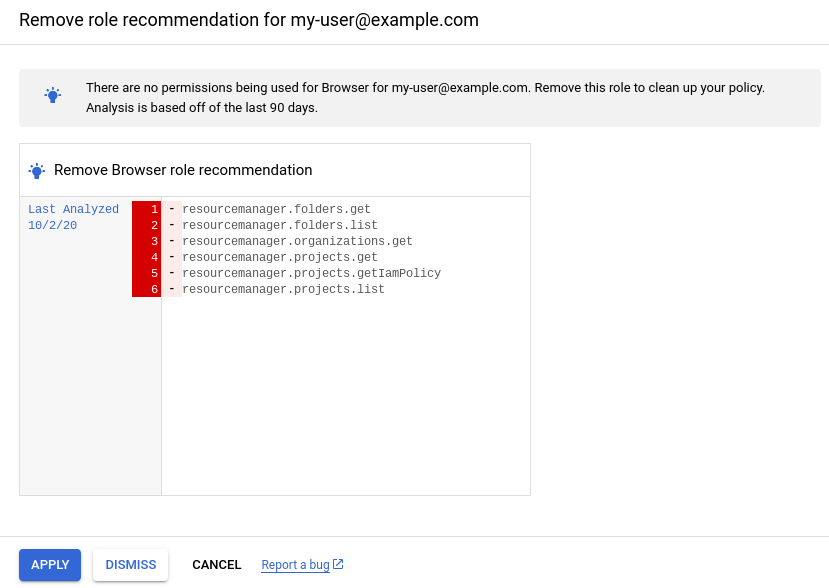
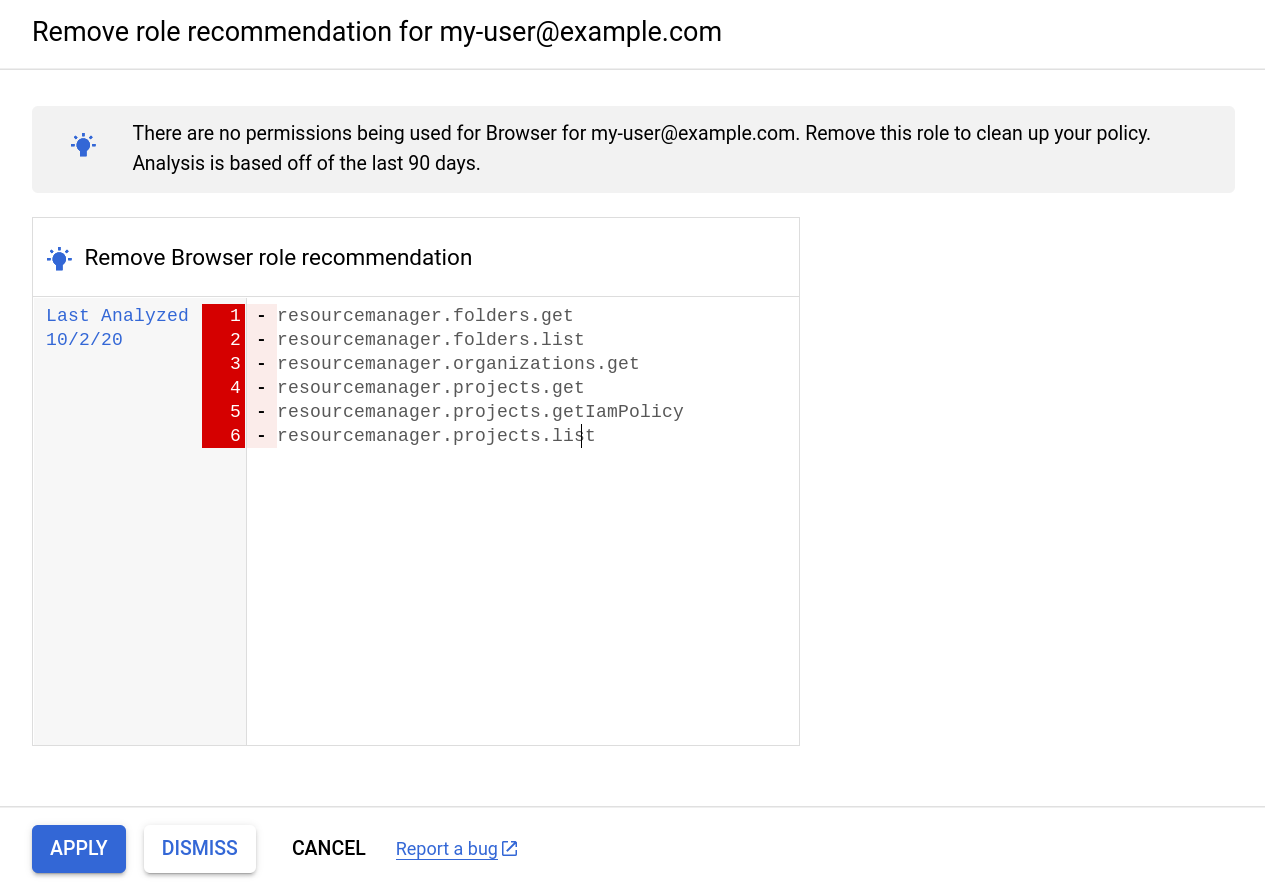
The user `my-user@example.com` was granted the Browser role on a project.
The Browser role includes six permissions that allow the user to view resources
in the project. However, during the past 90 days,
`my-user@example.com` hasn't viewed any resources.
Therefore, the IAM recommender generates a role recommendation
suggesting that you revoke the Browser role from `my-user@example.com`:
### Console
### gcloud
```json
{
"associatedInsights": [
{
"insight": "projects/123456789012/locations/global/insightTypes/google.iam.policy.Insight/insights/86c14538-dcfd-4326-afe5-ee8ac921e06a"
}
],
"content": {
"operationGroups": [
{
"operations": [
{
"action": "remove",
"path": "/iamPolicy/bindings/*/members/*",
"pathFilters": {
"/iamPolicy/bindings/*/condition/expression": "",
"/iamPolicy/bindings/*/members/*": "user:my-user@example.com",
"/iamPolicy/bindings/*/role": "roles/browser"
},
"resource": "//cloudresourcemanager.googleapis.com/projects/123456789012",
"resourceType": "cloudresourcemanager.googleapis.com/Project"
}
]
}
],
"overview": {
"member": "user:my-user@example.com",
"removedRole": "roles/browser",
"resource": "//cloudresourcemanager.googleapis.com/projects/123456789012"
}
},
"description": "This role has not been used during the observation window.",
"etag": "\"9fc3241da8bfab51\"",
"lastRefreshTime": "2022-05-20T07:00:00Z",
"name": "projects/123456789012/locations/global/recommenders/google.iam.policy.Recommender/recommendations/fe512038-5455-49g1-8f9c-752e31c8c154",
"primaryImpact": {
"category": "SECURITY",
"securityProjection": {
"details": {
"revokedIamPermissionsCount": 6
}
}
},
"priority": "P4",
"recommenderSubtype": "REMOVE_ROLE",
"stateInfo": {
"state": "ACTIVE"
}
}
```
### REST
```json
{
"name": "projects/123456789012/locations/global/recommenders/google.iam.policy.Recommender/recommendations/fe512038-5455-49g1-8f9c-752e31c8c154",
"description": "This role has not been used during the observation window.",
"lastRefreshTime": "2022-05-20T07:00:00Z",
"primaryImpact": {
"category": "SECURITY",
"securityProjection": {
"details": {
"revokedIamPermissionsCount": 6
}
}
},
"content": {
"operationGroups": [
{
"operations": [
{
"action": "remove",
"resourceType": "cloudresourcemanager.googleapis.com/Project",
"resource": "//cloudresourcemanager.googleapis.com/projects/123456789012",
"path": "/iamPolicy/bindings/*/members/*",
"pathFilters": {
"/iamPolicy/bindings/*/condition/expression": "",
"/iamPolicy/bindings/*/members/*": "user:my-user@example.com",
"/iamPolicy/bindings/*/role": "roles/browser"
}
}
]
}
],
"overview": {
"resource": "//cloudresourcemanager.googleapis.com/projects/123456789012",
"member": "user:my-user@example.com",
"removedRole": "roles/browser"
}
},
"stateInfo": {
"state": "ACTIVE"
},
"etag": "\"9fc3241da8bfab51\"",
"recommenderSubtype": "REMOVE_ROLE",
"associatedInsights": [
{
"insight": "projects/123456789012/locations/global/insightTypes/google.iam.policy.Insight/insights/86c14538-dcfd-4326-afe5-ee8ac921e06a"
}
],
"priority": "P4"
}
```
### Replace an existing role
A service account was granted the Editor role (`roles/editor`) on a project.
This basic role includes more than 3,000 permissions and grants extensive access
to the project. However, during the past 90 days, the
service account has only used a few of those permissions.
Therefore, the IAM recommender generates a role recommendation
suggesting that you revoke the Editor role and replace it with a combination of
two other roles, which removes thousands of excess permissions:
### Console


### gcloud
```json
{
"associatedInsights": [
{
"insight": "projects/123456789012/locations/global/insightTypes/google.iam.policy.Insight/insights/3d4ef3d6-bdf0-4330-975d-c65cb929c44d"
}
],
"content": {
"operationGroups": [
{
"operations": [
{
"action": "add",
"path": "/iamPolicy/bindings/*/members/-",
"pathFilters": {
"/iamPolicy/bindings/*/condition/expression": "",
"/iamPolicy/bindings/*/role": "roles/iam.serviceAccountUser"
},
"resource": "//cloudresourcemanager.googleapis.com/projects/123456789012",
"resourceType": "cloudresourcemanager.googleapis.com/Project",
"value": "user:my-user@example.com"
},
{
"action": "add",
"path": "/iamPolicy/bindings/*/members/-",
"pathFilters": {
"/iamPolicy/bindings/*/condition/expression": "",
"/iamPolicy/bindings/*/role": "roles/storage.objectAdmin"
},
"resource": "//cloudresourcemanager.googleapis.com/projects/123456789012",
"resourceType": "cloudresourcemanager.googleapis.com/Project",
"value": "user:my-user@example.com"
},
{
"action": "remove",
"path": "/iamPolicy/bindings/*/members/*",
"pathFilters": {
"/iamPolicy/bindings/*/condition/expression": "",
"/iamPolicy/bindings/*/members/*": "user:my-user@example.com",
"/iamPolicy/bindings/*/role": "roles/editor"
},
"resource": "//cloudresourcemanager.googleapis.com/projects/123456789012",
"resourceType": "cloudresourcemanager.googleapis.com/Project"
}
]
}
],
"overview": {
"addedRoles": [
"roles/iam.serviceAccountUser",
"roles/storage.objectAdmin"
],
"member": "user:my-user@example.com",
"minimumObservationPeriodInDays": "0",
"removedRole": "roles/editor",
"resource": "//cloudresourcemanager.googleapis.com/projects/123456789012"
}
},
"description": "Replace the current role with smaller predefined roles to cover the permissions needed.",
"etag": "\"0da9a354c2a83d96\"",
"lastRefreshTime": "2022-06-22T07:00:00Z",
"name": "projects/123456789012/locations/global/recommenders/google.iam.policy.Recommender/recommendations/4637db3d-dba5-45eb-95ac-b4ee4b4cd14e",
"primaryImpact": {
"category": "SECURITY",
"securityProjection": {
"details": {
"revokedIamPermissionsCount": 2998
}
}
},
"priority": "P2",
"recommenderSubtype": "REPLACE_ROLE",
"stateInfo": {
"state": "ACTIVE"
}
}
```
### REST
```json
{
"name": "projects/123456789012/locations/global/recommenders/google.iam.policy.Recommender/recommendations/4637db3d-dba5-45eb-95ac-b4ee4b4cd14e",
"description": "Replace the current role with smaller predefined roles to cover the permissions needed.",
"lastRefreshTime": "2022-06-22T07:00:00Z",
"primaryImpact": {
"category": "SECURITY",
"securityProjection": {
"details": {
"revokedIamPermissionsCount": 2998
}
}
},
"content": {
"operationGroups": [
{
"operations": [
{
"action": "add",
"resourceType": "cloudresourcemanager.googleapis.com/Project",
"resource": "//cloudresourcemanager.googleapis.com/projects/123456789012",
"path": "/iamPolicy/bindings/*/members/-",
"value": "user:my-user@example.com",
"pathFilters": {
"/iamPolicy/bindings/*/condition/expression": "",
"/iamPolicy/bindings/*/role": "roles/iam.serviceAccountOwner"
}
},
{
"action": "add",
"resourceType": "cloudresourcemanager.googleapis.com/Project",
"resource": "//cloudresourcemanager.googleapis.com/projects/123456789012",
"path": "/iamPolicy/bindings/*/members/-",
"value": "user:my-user@example.com",
"pathFilters": {
"/iamPolicy/bindings/*/condition/expression": "",
"/iamPolicy/bindings/*/role": "roles/storage.objectAdmin"
}
},
{
"action": "remove",
"resourceType": "cloudresourcemanager.googleapis.com/Project",
"resource": "//cloudresourcemanager.googleapis.com/projects/123456789012",
"path": "/iamPolicy/bindings/*/members/*",
"pathFilters": {
"/iamPolicy/bindings/*/condition/expression": "",
"/iamPolicy/bindings/*/members/*": "user:my-user@example.com",
"/iamPolicy/bindings/*/role": "roles/editor"
}
}
]
}
],
"overview": {
"resource": "//cloudresourcemanager.googleapis.com/projects/123456789012",
"member": "user:my-user@example.com",
"removedRole": "roles/editor",
"addedRoles": [
"roles/iam.serviceAccountUser",
"roles/storage.objectAdmin"
],
"minimumObservationPeriodInDays": "0"
}
},
"stateInfo": {
"state": "ACTIVE"
},
"etag": "\"0da9a354c2a83d96\"",
"recommenderSubtype": "REPLACE_ROLE",
"associatedInsights": [
{
"insight": "projects/123456789012/locations/global/insightTypes/google.iam.policy.Insight/insights/3d4ef3d6-bdf0-4330-975d-c65cb929c44d"
}
],
"priority": "P2"
}
```
### Create a custom role
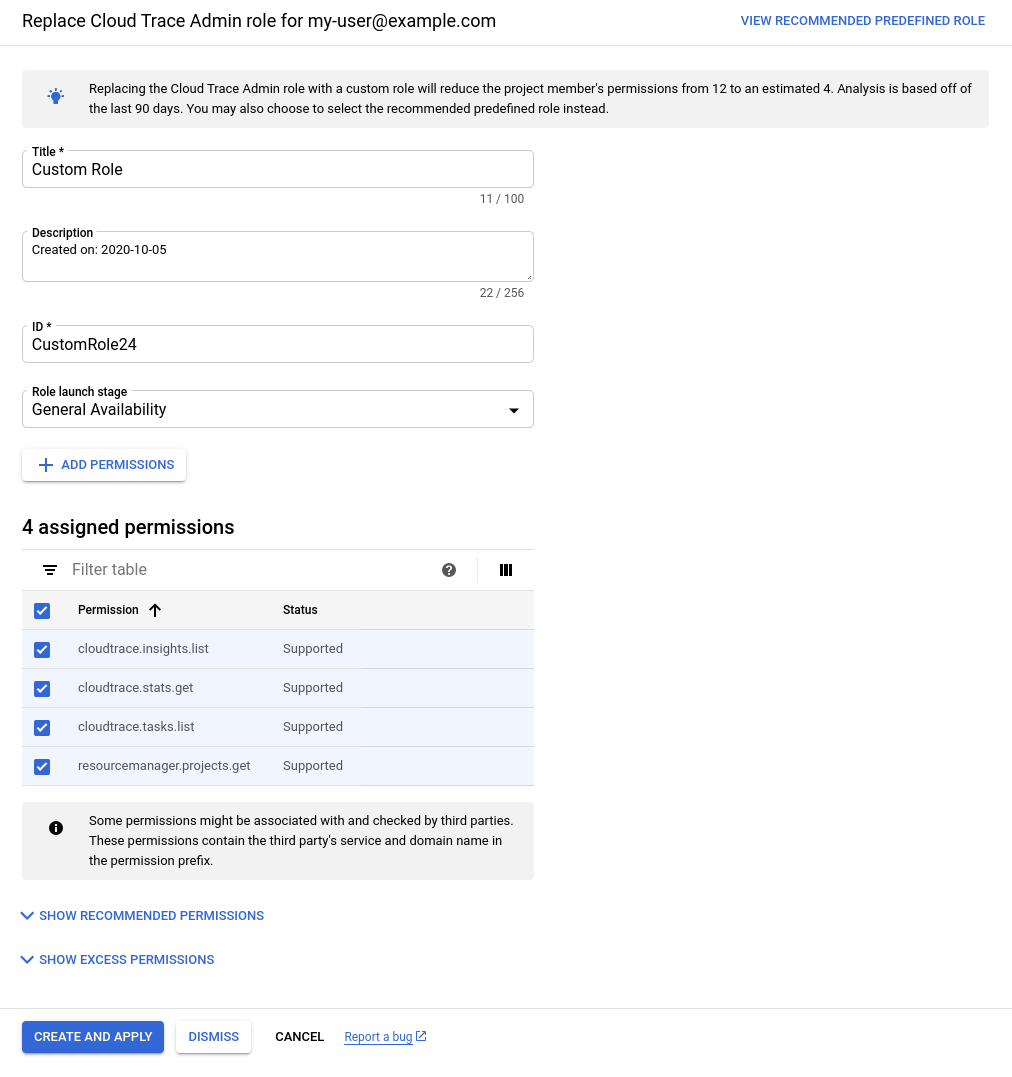
The user `my-user@example.com` was granted the Cloud Trace Admin role
(`roles/cloudtrace.admin`) on a project. The role includes more than 10
permissions, but a policy insight indicates that, during the past
90 days, `my-user@example.com` used only 4 of those
permissions.
Therefore, the IAM recommender generates a role recommendation
suggesting that you create a custom role that includes only the permissions that
`my-user@example.com` actually used:
### Console

### gcloud
The `REPLACE_ROLE_CUSTOMIZABLE` subtype indicates that the
IAM recommender recommends creating a custom role with the used
permissions. To see the used permissions, [get the associated policy
insight](https://docs.cloud.google.com/policy-intelligence/docs/policy-insights).
```json
{
"associatedInsights": [
{
"insight": "projects/123456789012/locations/global/insightTypes/google.iam.policy.Insight/insights/2799dc04-b12e-4cf6-86aa-d81907d31f58"
}
],
"associatedResourceNames": [
"//cloudresourcemanager.googleapis.com/projects/123456789012"
],
"content": {
"operationGroups": [
{
"operations": [
{
"action": "add",
"path": "/iamPolicy/bindings/*/members/-",
"pathFilters": {
"/iamPolicy/bindings/*/condition/expression": "",
"/iamPolicy/bindings/*/role": "roles/cloudtrace.user"
},
"resource": "//cloudresourcemanager.googleapis.com/projects/123456789012",
"resourceType": "cloudresourcemanager.googleapis.com/Project",
"value": "user:my-user@example.com"
},
{
"action": "remove",
"path": "/iamPolicy/bindings/*/members/*",
"pathFilters": {
"/iamPolicy/bindings/*/condition/expression": "",
"/iamPolicy/bindings/*/members/*": "user:my-user@example.com",
"/iamPolicy/bindings/*/role": "roles/cloudtrace.admin"
},
"resource": "//cloudresourcemanager.googleapis.com/projects/123456789012",
"resourceType": "cloudresourcemanager.googleapis.com/Project"
}
]
}
],
"overview": {
"minimumObservationPeriodInDays": "0"
}
},
"description": "Replace the current role with a smaller role to cover the permissions needed.",
"etag": "\"c7f57a4725d32d66\"",
"lastRefreshTime": "2022-06-22T07:00:00Z",
"name": "projects/123456789012/locations/global/recommenders/google.iam.policy.Recommender/recommendations/ba1fc977-fddd-3856-a829-f69649ae8075",
"originalContent": {},
"primaryImpact": {
"category": "SECURITY",
"securityProjection": {
"details": {},
"revokedIamPermissionsCount": 1
}
},
"priority": "P4",
"recommenderSubtype": "REPLACE_ROLE_CUSTOMIZABLE",
"stateInfo": {
"state": "ACTIVE"
},
"targetResources": [
"//cloudresourcemanager.googleapis.com/projects/123456789012"
]
}
```
### REST
The `REPLACE_ROLE_CUSTOMIZABLE` subtype indicates that
the IAM recommender recommends creating a custom role with the used
permissions. To see the used permissions, [get the associated policy
insight](https://docs.cloud.google.com/policy-intelligence/docs/policy-insights).
```json
{
"name": "projects/123456789012/locations/global/recommenders/google.iam.policy.Recommender/recommendations/ba1fc977-fddd-3856-a829-f69649ae8075",
"description": "Replace the current role with a smaller role to cover the permissions needed.",
"lastRefreshTime": "2022-06-22T07:00:00Z",
"primaryImpact": {
"category": "SECURITY",
"securityProjection": {
"details": {
"revokedIamPermissionsCount": 1
}
}
},
"content": {
"operationGroups": [
{
"operations": [
{
"action": "add",
"resourceType": "cloudresourcemanager.googleapis.com/Project",
"resource": "//cloudresourcemanager.googleapis.com/projects/123456789012",
"path": "/iamPolicy/bindings/*/members/-",
"value": "user:my-user@example.com",
"pathFilters": {
"/iamPolicy/bindings/*/condition/expression": "",
"/iamPolicy/bindings/*/role": "roles/cloudtrace.user"
}
},
{
"action": "remove",
"resourceType": "cloudresourcemanager.googleapis.com/Project",
"resource": "//cloudresourcemanager.googleapis.com/projects/123456789012",
"path": "/iamPolicy/bindings/*/members/*",
"pathFilters": {
"/iamPolicy/bindings/*/condition/expression": "",
"/iamPolicy/bindings/*/members/*": "user:my-user@example.com",
"/iamPolicy/bindings/*/role": "roles/cloudtrace.admin"
}
}
]
}
],
"overview": {
"minimumObservationPeriodInDays": "0"
}
},
"stateInfo": {
"state": "ACTIVE"
},
"etag": "\"c7f57a4725d32d66\"",
"recommenderSubtype": "REPLACE_ROLE_CUSTOMIZABLE",
"associatedInsights": [
{
"insight": "projects/123456789012/locations/global/insightTypes/google.iam.policy.Insight/insights/2799dc04-b12e-4cf6-86aa-d81907d31f58"
}
],
"priority": "P4"
}
```
The role recommendation also suggests another option, which is to replace
the existing role with the Cloud Trace User role
(`roles/cloudtrace.user`). This predefined role includes slightly fewer
permissions than the Cloud Trace Admin role.
### Role replacement with permissions suggested by machine learning
A service account was granted the Editor role (`roles/editor`) on a project.
This basic role includes more than 3,000 permissions and grants extensive access
to a project. However, a policy insight indicates that, during the past
90 days, the service account has used fewer than 10
permissions.
The policy insight also highlights several permissions that service account is
likely to need in the future. The IAM recommender identified these
permissions using [machine learning](https://docs.cloud.google.com/policy-intelligence/docs/role-recommendations-overview.md.txt#ml).
The IAM recommender generates a role recommendation suggesting that you
revoke the Editor role and replace it with the Storage Object Admin role
(`roles/storage.objectAdmin`), which grants full control of objects in a
Cloud Storage bucket. This change removes thousands of excess permissions, while
still including both the permissions the service account used and the
permissions that the service account is likely to need in the future:
### Console
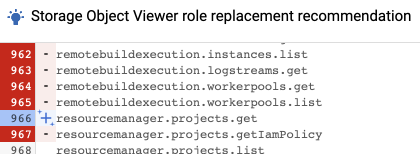
The IAM recommender uses a **Machine learning**

icon to identify permissions that were added based on the
IAM recommender's machine learning rather than on permission usage.
In this example, the `resourcemanager.projects.get` permission was recommended
based on machine learning:

### gcloud
Permissions that were added based on the IAM recommender's machine
learning rather than on permission usage aren't listed in the recommendation
itself. Instead, they're listed in the policy insights associated with the
recommendation. All ML-based permissions are listed in the `inferredPermissions`
field of the insight. In this example, the `resourcemanager.projects.get`
permission was recommended based on machine learning:
```yaml
associatedRecommendations:
- recommendation: projects/123456789012/locations/global/recommenders/google.iam.policy.Recommender/recommendations/0573b702-96a5-4622-a916-c762e7b0731f
category: SECURITY
content:
condition:
description: ''
expression: ''
location: ''
title: ''
currentTotalPermissionsCount: '5069'
exercisedPermissions:
- permission: storage.objects.create
- permission: storage.objects.delete
- permission: storage.objects.get
- permission: storage.objects.list
inferredPermissions:
- permission: resourcemanager.projects.get
member: serviceAccount:my-service-account@my-project.iam.gserviceaccount.com
role: roles/editor
description: 4 of the permissions in this role binding were used in the past 90 days.
etag: '"d3cdec23cc712bd0"'
insightSubtype: PERMISSIONS_USAGE
lastRefreshTime: '2020-07-11T07:00:00Z'
name: projects/123456789012/locations/global/insightTypes/google.iam.policy.Insight/insights/0d3ce433-f067-4e78-b6ae-03d7d1f6f040
observationPeriod: 7776000s
stateInfo:
state: ACTIVE
targetResources:
- //cloudresourcemanager.googleapis.com/projects/123456789012
severity: HIGH
```
To learn how to get a policy insight, see one of the following:
- [Review policy insights for projects, folders, and organizations](https://docs.cloud.google.com/policy-intelligence/docs/policy-insights.md.txt)
- [Review policy insights for Cloud Storage buckets](https://docs.cloud.google.com/policy-intelligence/docs/policy-insights-buckets.md.txt)
- [Review policy insights for BigQuery datasets](https://docs.cloud.google.com/policy-intelligence/docs/policy-insights-datasets.md.txt)
### REST
Permissions that were added based on the IAM recommender's machine
learning rather than on permission usage aren't listed in the recommendation
itself. Instead, they're listed in the policy insights associated with the
recommendation. All ML-based permissions are listed in the `inferredPermissions`
field of the insight. In this example, the `resourcemanager.projects.get`
permission was recommended based on machine learning:
```json
{
"name": "projects/123456789012/locations/global/insightTypes/google.iam.policy.Insight/insights/07841f74-02ce-4de8-bbe6-fc4eabb68568",
"description": "4 of the permissions in this role binding were used in the past 90 days.",
"content": {
"role": "roles/editor",
"member": "serviceAccount:my-service-account@my-project.iam.gserviceaccount.com",
"condition": {
"expression": "",
"title": "",
"description": "",
"location": ""
},
"exercisedPermissions": [
{
"permission": "storage.objects.create"
},
{
"permission": "storage.objects.delete"
},
{
"permission": "storage.objects.get"
},
{
"permission": "storage.objects.list"
}
],
"inferredPermissions": \[
{
"permission": "resourcemanager.projects.get"
}
\],
"currentTotalPermissionsCount": "5069"
},
"lastRefreshTime": "2020-07-12T07:00:00Z",
"observationPeriod": "7776000s",
"stateInfo": {
"state": "ACTIVE"
},
"category": "SECURITY",
"associatedRecommendations": [
{
"recommendation": "projects/123456789012/locations/global/recommenders/google.iam.policy.Recommender/recommendations/b1932220-867d-43d1-bd74-fb95876ab656"
}
],
"targetResources": [
"//cloudresourcemanager.googleapis.com/projects/123456789012"
],
"insightSubtype": "PERMISSIONS_USAGE",
"etag": "\"d3cdec23cc712bd0\"",
"severity": "HIGH"
}
```
To learn how to get a policy insight, see one of the following:
- [Review policy insights for projects, folders, and organizations](https://docs.cloud.google.com/policy-intelligence/docs/policy-insights.md.txt)
- [Review policy insights for Cloud Storage buckets](https://docs.cloud.google.com/policy-intelligence/docs/policy-insights-buckets.md.txt)
- [Review policy insights for BigQuery datasets](https://docs.cloud.google.com/policy-intelligence/docs/policy-insights-datasets.md.txt)
## What's next
- Understand [best practices for using role recommendations](https://docs.cloud.google.com/policy-intelligence/docs/role-recommendations-best-practices.md.txt).
- [Review and apply role recommendations for projects, folders, and
organizations](https://docs.cloud.google.com/policy-intelligence/docs/review-apply-role-recommendations).
- [Review and apply your role recommendations for Cloud Storage
buckets](https://docs.cloud.google.com/policy-intelligence/docs/review-apply-role-recommendations-buckets)
- [Review and apply your role recommendations for BigQuery
datasets](https://docs.cloud.google.com/policy-intelligence/docs/review-apply-role-recommendations-datasets)
- Learn more about [Recommender](https://docs.cloud.google.com/recommender/docs/overview).
- Understand [predefined roles](https://docs.cloud.google.com/iam/docs/understanding-roles) and [custom roles](https://docs.cloud.google.com/iam/docs/understanding-custom-roles) in IAM.