# Specify nested and repeated columns in table schemas
Nested and repeated columns let you store related data, such as a book and its
authors, in a single BigQuery table instead of in separate tables that
you join. Because BigQuery performs best with denormalized data,
these columns help you maintain relationships without the performance cost of a
normalized schema.
This document describes how to define nested and repeated columns in a table
schema, insert and modify data in them, and decide when to use them. For an
overview of table schemas, see [Specify a schema](https://docs.cloud.google.com/bigquery/docs/schemas).
## Define nested and repeated columns
To create a column with nested data, set the data type of the column to
`RECORD` in the schema. A `RECORD` can be accessed as a
[`STRUCT`](https://docs.cloud.google.com/bigquery/docs/reference/standard-sql/data-types#struct_type) type
in GoogleSQL. A `STRUCT` is a container of ordered fields.
To create a column with repeated data, set the
[mode](https://docs.cloud.google.com/bigquery/docs/schemas#modes) of the column to `REPEATED` in the schema.
A repeated field can be accessed as an
[`ARRAY`](https://docs.cloud.google.com/bigquery/docs/reference/standard-sql/data-types#array_type) type in
GoogleSQL.
A `RECORD` column can have `REPEATED` mode, which is represented as an array of
`STRUCT` types. Also, a field within a record can be repeated, which is
represented as a `STRUCT` that contains an `ARRAY`. An array cannot contain
another array directly. For more information, see
[Declaring an `ARRAY` type](https://docs.cloud.google.com/bigquery/docs/reference/standard-sql/data-types#declaring_an_array_type).
## Limitations
Nested and repeated schemas are subject to the following limitations:
**A schema cannot contain more than 15 levels of nested `RECORD` types.**
: Columns of type `RECORD` can contain nested `RECORD` types, also called
*child* records. The maximum nested depth limit is 15 levels. This limit is
independent of whether the `RECORD`s are scalar or array-based (repeated).
**`RECORD` type is incompatible with `UNION`, `INTERSECT`, `EXCEPT DISTINCT`, and `SELECT DISTINCT`.**
## Example schema
The following example shows sample nested and repeated data. This table contains
information about people. It consists of the following fields:
- `id`
- `first_name`
- `last_name`
- `dob` (date of birth)
- `addresses` (a nested and repeated field)
- `addresses.status` (current or previous)
- `addresses.address`
- `addresses.city`
- `addresses.state`
- `addresses.zip`
- `addresses.numberOfYears` (years at the address)
The JSON data file would look like the following. Notice that the addresses
column contains an array of values (indicated by `[ ]`). The multiple addresses
in the array are the repeated data. The multiple fields within each address are
the nested data.
```
{"id":"1","first_name":"John","last_name":"Doe","dob":"1968-01-22","addresses":[{"status":"current","address":"123 First Avenue","city":"Seattle","state":"WA","zip":"11111","numberOfYears":"1"},{"status":"previous","address":"456 Main Street","city":"Portland","state":"OR","zip":"22222","numberOfYears":"5"}]}
{"id":"2","first_name":"Jane","last_name":"Doe","dob":"1980-10-16","addresses":[{"status":"current","address":"789 Any Avenue","city":"New York","state":"NY","zip":"33333","numberOfYears":"2"},{"status":"previous","address":"321 Main Street","city":"Hoboken","state":"NJ","zip":"44444","numberOfYears":"3"}]}
```
The schema for this table looks like the following:
```json
[
{
"name": "id",
"type": "STRING",
"mode": "NULLABLE"
},
{
"name": "first_name",
"type": "STRING",
"mode": "NULLABLE"
},
{
"name": "last_name",
"type": "STRING",
"mode": "NULLABLE"
},
{
"name": "dob",
"type": "DATE",
"mode": "NULLABLE"
},
{
"name": "addresses",
"type": "RECORD",
"mode": "REPEATED",
"fields": [
{
"name": "status",
"type": "STRING",
"mode": "NULLABLE"
},
{
"name": "address",
"type": "STRING",
"mode": "NULLABLE"
},
{
"name": "city",
"type": "STRING",
"mode": "NULLABLE"
},
{
"name": "state",
"type": "STRING",
"mode": "NULLABLE"
},
{
"name": "zip",
"type": "STRING",
"mode": "NULLABLE"
},
{
"name": "numberOfYears",
"type": "STRING",
"mode": "NULLABLE"
}
]
}
]
```
### Specifying the nested and repeated columns in the example
To create a new table with the previous nested and repeated columns, select one
of the following options:
### Console
Specify the nested and repeated `addresses` column:
1. In the Google Cloud console, open the BigQuery page.
[Go to BigQuery](https://console.cloud.google.com/bigquery)
2. In the left pane, click **Explorer**:

If you don't see the left pane, click **Expand left pane** to open the pane.
3. In the **Explorer** pane, expand your project, click **Datasets**, and
then select a dataset.
4. In the details pane, click
**Create table**.
5. On the **Create table** page, specify the following details:
- For **Source** , in the **Create table from** field, select **Empty
table**.
- In the **Destination** section, specify the following fields:
- For **Dataset**, select the dataset in which you want to create the table.
- For **Table**, enter the name of the table that you want to create.
- For **Schema** , click
**Add field** and enter the following table schema:
- For **Field name** , enter `addresses`.
- For **Type** , select **RECORD**.
- For **Mode** , choose **REPEATED** . 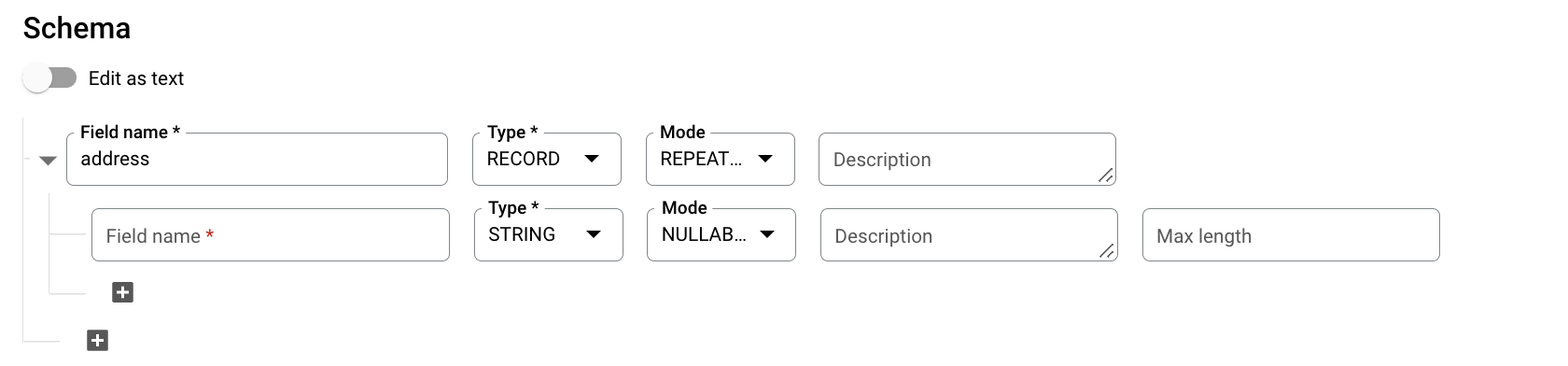
- Specify the following fields for a nested field:
- In the **Field name** field, enter `status`.
- For **Type** , choose **STRING**.
- For **Mode** , leave the value set to **NULLABLE**.
- Click
**Add field** to add the following fields:
| Field name | Type | Mode |
|---|---|---|
| `address` | `STRING` | `NULLABLE` |
| `city` | `STRING` | `NULLABLE` |
| `state` | `STRING` | `NULLABLE` |
| `zip` | `STRING` | `NULLABLE` |
| `numberOfYears` | `STRING` | `NULLABLE` |
Alternatively, click **Edit as text** and specify the schema as a
JSON array.
### SQL
Use the
[`CREATE TABLE` statement](https://docs.cloud.google.com/bigquery/docs/reference/standard-sql/data-definition-language#create_table_statement).
Specify the schema using the
[column](https://docs.cloud.google.com/bigquery/docs/reference/standard-sql/data-definition-language#column_name_and_column_schema)
option:
1. In the Google Cloud console, go to the **BigQuery** page.
[Go to BigQuery](https://console.cloud.google.com/bigquery)
2. In the query editor, enter the following statement:
```googlesql
CREATE TABLE IF NOT EXISTS mydataset.mytable (
id STRING,
first_name STRING,
last_name STRING,
dob DATE,
addresses
ARRAY<
STRUCT<
status STRING,
address STRING,
city STRING,
state STRING,
zip STRING,
numberOfYears STRING>>
) OPTIONS (
description = 'Example name and addresses table');
```
3. Click **Run**.
For more information about how to run queries, see [Run an interactive query](https://docs.cloud.google.com/bigquery/docs/running-queries#queries).
### bq
To specify the nested and repeated `addresses` column in a JSON schema file,
use a text editor to create a new file. Paste in the example schema
definition shown above.
After you create your JSON schema file, you can provide it through the
bq command-line tool. For more information, see
[Using a JSON schema file](https://docs.cloud.google.com/bigquery/docs/schemas#using_a_json_schema_file).
### Go
Before trying this sample, follow the Go setup instructions in the
[BigQuery quickstart using
client libraries](https://docs.cloud.google.com/bigquery/docs/quickstarts/quickstart-client-libraries).
For more information, see the
[BigQuery Go API
reference documentation](https://godoc.org/cloud.google.com/go/bigquery).
To authenticate to BigQuery, set up Application Default Credentials.
For more information, see
[Set up authentication for client libraries](https://docs.cloud.google.com/bigquery/docs/authentication#client-libs).
import (
"context"
"fmt"
"io"
"cloud.google.com/go/bigquery"
)
// createTableComplexSchema demonstrates creating a BigQuery table and specifying a complex schema that includes
// an array of Struct types.
func createTableComplexSchema(w io.Writer, projectID, datasetID, tableID string) error {
// projectID := "my-project-id"
// datasetID := "mydatasetid"
// tableID := "mytableid"
ctx := context.Background()
client, err := bigquery.NewClient(ctx, projectID)
if err != nil {
return fmt.Errorf("bigquery.NewClient: %v", err)
}
defer client.Close()
sampleSchema := bigquery.https://docs.cloud.google.com/go/docs/reference/cloud.google.com/go/bigquery/latest/index.html#cloud_google_com_go_bigquery_Schema{
{Name: "id", Type: bigquery.https://docs.cloud.google.com/go/docs/reference/cloud.google.com/go/bigquery/latest/index.html#cloud_google_com_go_bigquery_StringFieldType_BytesFieldType_IntegerFieldType_FloatFieldType_BooleanFieldType_TimestampFieldType_RecordFieldType_DateFieldType_TimeFieldType_DateTimeFieldType_NumericFieldType_GeographyFieldType_BigNumericFieldType_IntervalFieldType_JSONFieldType_RangeFieldType},
{Name: "first_name", Type: bigquery.https://docs.cloud.google.com/go/docs/reference/cloud.google.com/go/bigquery/latest/index.html#cloud_google_com_go_bigquery_StringFieldType_BytesFieldType_IntegerFieldType_FloatFieldType_BooleanFieldType_TimestampFieldType_RecordFieldType_DateFieldType_TimeFieldType_DateTimeFieldType_NumericFieldType_GeographyFieldType_BigNumericFieldType_IntervalFieldType_JSONFieldType_RangeFieldType},
{Name: "last_name", Type: bigquery.https://docs.cloud.google.com/go/docs/reference/cloud.google.com/go/bigquery/latest/index.html#cloud_google_com_go_bigquery_StringFieldType_BytesFieldType_IntegerFieldType_FloatFieldType_BooleanFieldType_TimestampFieldType_RecordFieldType_DateFieldType_TimeFieldType_DateTimeFieldType_NumericFieldType_GeographyFieldType_BigNumericFieldType_IntervalFieldType_JSONFieldType_RangeFieldType},
{Name: "dob", Type: bigquery.https://docs.cloud.google.com/go/docs/reference/cloud.google.com/go/bigquery/latest/index.html#cloud_google_com_go_bigquery_StringFieldType_BytesFieldType_IntegerFieldType_FloatFieldType_BooleanFieldType_TimestampFieldType_RecordFieldType_DateFieldType_TimeFieldType_DateTimeFieldType_NumericFieldType_GeographyFieldType_BigNumericFieldType_IntervalFieldType_JSONFieldType_RangeFieldType},
{Name: "addresses",
Type: bigquery.https://docs.cloud.google.com/go/docs/reference/cloud.google.com/go/bigquery/latest/index.html#cloud_google_com_go_bigquery_StringFieldType_BytesFieldType_IntegerFieldType_FloatFieldType_BooleanFieldType_TimestampFieldType_RecordFieldType_DateFieldType_TimeFieldType_DateTimeFieldType_NumericFieldType_GeographyFieldType_BigNumericFieldType_IntervalFieldType_JSONFieldType_RangeFieldType,
Repeated: true,
Schema: bigquery.https://docs.cloud.google.com/go/docs/reference/cloud.google.com/go/bigquery/latest/index.html#cloud_google_com_go_bigquery_Schema{
{Name: "status", Type: bigquery.https://docs.cloud.google.com/go/docs/reference/cloud.google.com/go/bigquery/latest/index.html#cloud_google_com_go_bigquery_StringFieldType_BytesFieldType_IntegerFieldType_FloatFieldType_BooleanFieldType_TimestampFieldType_RecordFieldType_DateFieldType_TimeFieldType_DateTimeFieldType_NumericFieldType_GeographyFieldType_BigNumericFieldType_IntervalFieldType_JSONFieldType_RangeFieldType},
{Name: "address", Type: bigquery.https://docs.cloud.google.com/go/docs/reference/cloud.google.com/go/bigquery/latest/index.html#cloud_google_com_go_bigquery_StringFieldType_BytesFieldType_IntegerFieldType_FloatFieldType_BooleanFieldType_TimestampFieldType_RecordFieldType_DateFieldType_TimeFieldType_DateTimeFieldType_NumericFieldType_GeographyFieldType_BigNumericFieldType_IntervalFieldType_JSONFieldType_RangeFieldType},
{Name: "city", Type: bigquery.https://docs.cloud.google.com/go/docs/reference/cloud.google.com/go/bigquery/latest/index.html#cloud_google_com_go_bigquery_StringFieldType_BytesFieldType_IntegerFieldType_FloatFieldType_BooleanFieldType_TimestampFieldType_RecordFieldType_DateFieldType_TimeFieldType_DateTimeFieldType_NumericFieldType_GeographyFieldType_BigNumericFieldType_IntervalFieldType_JSONFieldType_RangeFieldType},
{Name: "state", Type: bigquery.https://docs.cloud.google.com/go/docs/reference/cloud.google.com/go/bigquery/latest/index.html#cloud_google_com_go_bigquery_StringFieldType_BytesFieldType_IntegerFieldType_FloatFieldType_BooleanFieldType_TimestampFieldType_RecordFieldType_DateFieldType_TimeFieldType_DateTimeFieldType_NumericFieldType_GeographyFieldType_BigNumericFieldType_IntervalFieldType_JSONFieldType_RangeFieldType},
{Name: "zip", Type: bigquery.https://docs.cloud.google.com/go/docs/reference/cloud.google.com/go/bigquery/latest/index.html#cloud_google_com_go_bigquery_StringFieldType_BytesFieldType_IntegerFieldType_FloatFieldType_BooleanFieldType_TimestampFieldType_RecordFieldType_DateFieldType_TimeFieldType_DateTimeFieldType_NumericFieldType_GeographyFieldType_BigNumericFieldType_IntervalFieldType_JSONFieldType_RangeFieldType},
{Name: "numberOfYears", Type: bigquery.https://docs.cloud.google.com/go/docs/reference/cloud.google.com/go/bigquery/latest/index.html#cloud_google_com_go_bigquery_StringFieldType_BytesFieldType_IntegerFieldType_FloatFieldType_BooleanFieldType_TimestampFieldType_RecordFieldType_DateFieldType_TimeFieldType_DateTimeFieldType_NumericFieldType_GeographyFieldType_BigNumericFieldType_IntervalFieldType_JSONFieldType_RangeFieldType},
}},
}
metaData := &bigquery.https://docs.cloud.google.com/go/docs/reference/cloud.google.com/go/bigquery/latest/index.html#cloud_google_com_go_bigquery_TableMetadata{
Schema: sampleSchema,
}
tableRef := client.Dataset(datasetID).Table(tableID)
if err := tableRef.Create(ctx, metaData); err != nil {
return err
}
fmt.Fprintf(w, "created table %s\n", tableRef.FullyQualifiedName())
return nil
}
### Java
Before trying this sample, follow the Java setup instructions in the
[BigQuery quickstart using
client libraries](https://docs.cloud.google.com/bigquery/docs/quickstarts/quickstart-client-libraries).
For more information, see the
[BigQuery Java API
reference documentation](https://docs.cloud.google.com/java/docs/reference/google-cloud-bigquery/latest/overview).
To authenticate to BigQuery, set up Application Default Credentials.
For more information, see
[Set up authentication for client libraries](https://docs.cloud.google.com/bigquery/docs/authentication#client-libs).
import com.google.cloud.bigquery.https://docs.cloud.google.com/java/docs/reference/google-cloud-bigquery/latest/com.google.cloud.bigquery.BigQuery.html;
import com.google.cloud.bigquery.https://docs.cloud.google.com/java/docs/reference/google-cloud-bigquery/latest/com.google.cloud.bigquery.BigQueryException.html;
import com.google.cloud.bigquery.https://docs.cloud.google.com/java/docs/reference/google-cloud-bigquery/latest/com.google.cloud.bigquery.BigQueryOptions.html;
import com.google.cloud.bigquery.https://docs.cloud.google.com/java/docs/reference/google-cloud-bigquery/latest/com.google.cloud.bigquery.Field.html;
import com.google.cloud.bigquery.https://docs.cloud.google.com/java/docs/reference/google-cloud-bigquery/latest/com.google.cloud.bigquery.Field.html.Mode;
import com.google.cloud.bigquery.https://docs.cloud.google.com/java/docs/reference/google-cloud-bigquery/latest/com.google.cloud.bigquery.Schema.html;
import com.google.cloud.bigquery.https://docs.cloud.google.com/java/docs/reference/google-cloud-bigquery/latest/com.google.cloud.bigquery.StandardSQLTypeName.html;
import com.google.cloud.bigquery.https://docs.cloud.google.com/java/docs/reference/google-cloud-bigquery/latest/com.google.cloud.bigquery.StandardTableDefinition.html;
import com.google.cloud.bigquery.https://docs.cloud.google.com/java/docs/reference/google-cloud-bigquery/latest/com.google.cloud.bigquery.TableDefinition.html;
import com.google.cloud.bigquery.https://docs.cloud.google.com/java/docs/reference/google-cloud-bigquery/latest/com.google.cloud.bigquery.TableId.html;
import com.google.cloud.bigquery.https://docs.cloud.google.com/java/docs/reference/google-cloud-bigquery/latest/com.google.cloud.bigquery.TableInfo.html;
public class NestedRepeatedSchema {
public static void runNestedRepeatedSchema() {
// TODO(developer): Replace these variables before running the sample.
String datasetName = "MY_DATASET_NAME";
String tableName = "MY_TABLE_NAME";
createTableWithNestedRepeatedSchema(datasetName, tableName);
}
public static void createTableWithNestedRepeatedSchema(String datasetName, String tableName) {
try {
// Initialize client that will be used to send requests. This client only needs to be created
// once, and can be reused for multiple requests.
https://docs.cloud.google.com/java/docs/reference/google-cloud-bigquery/latest/com.google.cloud.bigquery.BigQuery.html bigquery = https://docs.cloud.google.com/java/docs/reference/google-cloud-bigquery/latest/com.google.cloud.bigquery.BigQueryOptions.html.getDefaultInstance().getService();
https://docs.cloud.google.com/java/docs/reference/google-cloud-bigquery/latest/com.google.cloud.bigquery.TableId.html tableId = https://docs.cloud.google.com/java/docs/reference/google-cloud-bigquery/latest/com.google.cloud.bigquery.TableId.html.of(datasetName, tableName);
https://docs.cloud.google.com/java/docs/reference/google-cloud-bigquery/latest/com.google.cloud.bigquery.Schema.html schema =
https://docs.cloud.google.com/java/docs/reference/google-cloud-bigquery/latest/com.google.cloud.bigquery.Schema.html.of(
https://docs.cloud.google.com/java/docs/reference/google-cloud-bigquery/latest/com.google.cloud.bigquery.Field.html.of("id", https://docs.cloud.google.com/java/docs/reference/google-cloud-bigquery/latest/com.google.cloud.bigquery.StandardSQLTypeName.html.STRING),
https://docs.cloud.google.com/java/docs/reference/google-cloud-bigquery/latest/com.google.cloud.bigquery.Field.html.of("first_name", https://docs.cloud.google.com/java/docs/reference/google-cloud-bigquery/latest/com.google.cloud.bigquery.StandardSQLTypeName.html.STRING),
https://docs.cloud.google.com/java/docs/reference/google-cloud-bigquery/latest/com.google.cloud.bigquery.Field.html.of("last_name", https://docs.cloud.google.com/java/docs/reference/google-cloud-bigquery/latest/com.google.cloud.bigquery.StandardSQLTypeName.html.STRING),
https://docs.cloud.google.com/java/docs/reference/google-cloud-bigquery/latest/com.google.cloud.bigquery.Field.html.of("dob", https://docs.cloud.google.com/java/docs/reference/google-cloud-bigquery/latest/com.google.cloud.bigquery.StandardSQLTypeName.html.DATE),
// create the nested and repeated field
https://docs.cloud.google.com/java/docs/reference/google-cloud-bigquery/latest/com.google.cloud.bigquery.Field.html.newBuilder(
"addresses",
https://docs.cloud.google.com/java/docs/reference/google-cloud-bigquery/latest/com.google.cloud.bigquery.StandardSQLTypeName.html.STRUCT,
https://docs.cloud.google.com/java/docs/reference/google-cloud-bigquery/latest/com.google.cloud.bigquery.Field.html.of("status", https://docs.cloud.google.com/java/docs/reference/google-cloud-bigquery/latest/com.google.cloud.bigquery.StandardSQLTypeName.html.STRING),
https://docs.cloud.google.com/java/docs/reference/google-cloud-bigquery/latest/com.google.cloud.bigquery.Field.html.of("address", https://docs.cloud.google.com/java/docs/reference/google-cloud-bigquery/latest/com.google.cloud.bigquery.StandardSQLTypeName.html.STRING),
https://docs.cloud.google.com/java/docs/reference/google-cloud-bigquery/latest/com.google.cloud.bigquery.Field.html.of("city", https://docs.cloud.google.com/java/docs/reference/google-cloud-bigquery/latest/com.google.cloud.bigquery.StandardSQLTypeName.html.STRING),
https://docs.cloud.google.com/java/docs/reference/google-cloud-bigquery/latest/com.google.cloud.bigquery.Field.html.of("state", https://docs.cloud.google.com/java/docs/reference/google-cloud-bigquery/latest/com.google.cloud.bigquery.StandardSQLTypeName.html.STRING),
https://docs.cloud.google.com/java/docs/reference/google-cloud-bigquery/latest/com.google.cloud.bigquery.Field.html.of("zip", https://docs.cloud.google.com/java/docs/reference/google-cloud-bigquery/latest/com.google.cloud.bigquery.StandardSQLTypeName.html.STRING),
https://docs.cloud.google.com/java/docs/reference/google-cloud-bigquery/latest/com.google.cloud.bigquery.Field.html.of("numberOfYears", https://docs.cloud.google.com/java/docs/reference/google-cloud-bigquery/latest/com.google.cloud.bigquery.StandardSQLTypeName.html.STRING))
.setMode(Mode.REPEATED)
.build());
https://docs.cloud.google.com/java/docs/reference/google-cloud-bigquery/latest/com.google.cloud.bigquery.TableDefinition.html tableDefinition = https://docs.cloud.google.com/java/docs/reference/google-cloud-bigquery/latest/com.google.cloud.bigquery.StandardTableDefinition.html.of(schema);
https://docs.cloud.google.com/java/docs/reference/google-cloud-bigquery/latest/com.google.cloud.bigquery.TableInfo.html tableInfo = https://docs.cloud.google.com/java/docs/reference/google-cloud-bigquery/latest/com.google.cloud.bigquery.TableInfo.html.newBuilder(tableId, tableDefinition).build();
bigquery.https://docs.cloud.google.com/java/docs/reference/google-cloud-bigquery/latest/com.google.cloud.bigquery.BigQuery.html#com_google_cloud_bigquery_BigQuery_create_com_google_cloud_bigquery_DatasetInfo_com_google_cloud_bigquery_BigQuery_DatasetOption____(tableInfo);
System.out.println("Table with nested and repeated schema created successfully");
} catch (https://docs.cloud.google.com/java/docs/reference/google-cloud-bigquery/latest/com.google.cloud.bigquery.BigQueryException.html e) {
System.out.println("Table was not created. \n" + e.toString());
}
}
}
### Node.js
Before trying this sample, follow the Node.js setup instructions in the
[BigQuery quickstart using
client libraries](https://docs.cloud.google.com/bigquery/docs/quickstarts/quickstart-client-libraries).
For more information, see the
[BigQuery Node.js API
reference documentation](https://googleapis.dev/nodejs/bigquery/latest/index.html).
To authenticate to BigQuery, set up Application Default Credentials.
For more information, see
[Set up authentication for client libraries](https://docs.cloud.google.com/bigquery/docs/authentication#client-libs).
// Import the Google Cloud client library and create a client
const {BigQuery} = require('https://docs.cloud.google.com/nodejs/docs/reference/bigquery/latest/overview.html');
const bigquery = new https://docs.cloud.google.com/nodejs/docs/reference/bigquery/latest/bigquery/bigquery.html();
async function nestedRepeatedSchema() {
// Creates a new table named "my_table" in "my_dataset"
// with nested and repeated columns in schema.
/**
* TODO(developer): Uncomment the following lines before running the sample.
*/
// const datasetId = "my_dataset";
// const tableId = "my_table";
// const schema = [
// {name: 'Name', type: 'STRING', mode: 'REQUIRED'},
// {
// name: 'Addresses',
// type: 'RECORD',
// mode: 'REPEATED',
// fields: [
// {name: 'Address', type: 'STRING'},
// {name: 'City', type: 'STRING'},
// {name: 'State', type: 'STRING'},
// {name: 'Zip', type: 'STRING'},
// ],
// },
// ];
// For all options, see https://cloud.google.com/bigquery/docs/reference/v2/tables#resource
const options = {
schema: schema,
location: 'US',
};
// Create a new table in the dataset
const [table] = await bigquery
.dataset(datasetId)
.https://docs.cloud.google.com/nodejs/docs/reference/bigquery/latest/bigquery/dataset.html(tableId, options);
console.log(`Table ${table.id} created.`);
}
### Python
Before trying this sample, follow the Python setup instructions in the
[BigQuery quickstart using
client libraries](https://docs.cloud.google.com/bigquery/docs/quickstarts/quickstart-client-libraries).
For more information, see the
[BigQuery Python API
reference documentation](https://docs.cloud.google.com/python/docs/reference/bigquery/latest).
To authenticate to BigQuery, set up Application Default Credentials.
For more information, see
[Set up authentication for client libraries](https://docs.cloud.google.com/bigquery/docs/authentication#client-libs).
from google.cloud import https://docs.cloud.google.com/python/docs/reference/bigquery/latest
client = https://docs.cloud.google.com/python/docs/reference/bigquery/latest.https://docs.cloud.google.com/python/docs/reference/bigquery/latest/google.cloud.bigquery.client.Client.html()
# TODO(dev): Change table_id to the full name of the table you want to create.
table_id = "your-project.your_dataset.your_table_name"
schema = [
https://docs.cloud.google.com/python/docs/reference/bigquery/latest.https://docs.cloud.google.com/python/docs/reference/bigquery/latest/google.cloud.bigquery.schema.SchemaField.html("id", "STRING", mode="NULLABLE"),
https://docs.cloud.google.com/python/docs/reference/bigquery/latest.https://docs.cloud.google.com/python/docs/reference/bigquery/latest/google.cloud.bigquery.schema.SchemaField.html("first_name", "STRING", mode="NULLABLE"),
https://docs.cloud.google.com/python/docs/reference/bigquery/latest.https://docs.cloud.google.com/python/docs/reference/bigquery/latest/google.cloud.bigquery.schema.SchemaField.html("last_name", "STRING", mode="NULLABLE"),
https://docs.cloud.google.com/python/docs/reference/bigquery/latest.https://docs.cloud.google.com/python/docs/reference/bigquery/latest/google.cloud.bigquery.schema.SchemaField.html("dob", "DATE", mode="NULLABLE"),
https://docs.cloud.google.com/python/docs/reference/bigquery/latest.https://docs.cloud.google.com/python/docs/reference/bigquery/latest/google.cloud.bigquery.schema.SchemaField.html(
"addresses",
"RECORD",
mode="REPEATED",
fields=[
https://docs.cloud.google.com/python/docs/reference/bigquery/latest.https://docs.cloud.google.com/python/docs/reference/bigquery/latest/google.cloud.bigquery.schema.SchemaField.html("status", "STRING", mode="NULLABLE"),
https://docs.cloud.google.com/python/docs/reference/bigquery/latest.https://docs.cloud.google.com/python/docs/reference/bigquery/latest/google.cloud.bigquery.schema.SchemaField.html("address", "STRING", mode="NULLABLE"),
https://docs.cloud.google.com/python/docs/reference/bigquery/latest.https://docs.cloud.google.com/python/docs/reference/bigquery/latest/google.cloud.bigquery.schema.SchemaField.html("city", "STRING", mode="NULLABLE"),
https://docs.cloud.google.com/python/docs/reference/bigquery/latest.https://docs.cloud.google.com/python/docs/reference/bigquery/latest/google.cloud.bigquery.schema.SchemaField.html("state", "STRING", mode="NULLABLE"),
https://docs.cloud.google.com/python/docs/reference/bigquery/latest.https://docs.cloud.google.com/python/docs/reference/bigquery/latest/google.cloud.bigquery.schema.SchemaField.html("zip", "STRING", mode="NULLABLE"),
https://docs.cloud.google.com/python/docs/reference/bigquery/latest.https://docs.cloud.google.com/python/docs/reference/bigquery/latest/google.cloud.bigquery.schema.SchemaField.html("numberOfYears", "STRING", mode="NULLABLE"),
],
),
]
table = https://docs.cloud.google.com/python/docs/reference/bigquery/latest.https://docs.cloud.google.com/python/docs/reference/bigquery/latest/google.cloud.bigquery.table.Table.html(table_id, schema=schema)
table = client.https://docs.cloud.google.com/python/docs/reference/bigquery/latest/google.cloud.bigquery.client.Client.html#google_cloud_bigquery_client_Client_create_table(table) # API request
print(f"Created table {table.project}.{table.dataset_id}.{table.table_id}.")
## Insert data in nested columns in the example
Use the following queries to insert nested data records into tables that have `RECORD` data type columns.
**Example 1**
```googlesql
INSERT INTO mydataset.mytable (id,
first_name,
last_name,
dob,
addresses) values ("1","Johnny","Dawn","1969-01-22",
ARRAY<
STRUCT<
status STRING,
address STRING,
city STRING,
state STRING,
zip STRING,
numberOfYears STRING>>
[("current","123 First Avenue","Seattle","WA","11111","1")])
```
**Example 2**
```googlesql
INSERT INTO mydataset.mytable (id,
first_name,
last_name,
dob,
addresses) values ("1","Johnny","Dawn","1969-01-22",[("current","123 First Avenue","Seattle","WA","11111","1")])
```
### Query nested and repeated columns
To select the value of an `ARRAY` at a specific position, use an [array subscript
operator](https://docs.cloud.google.com/bigquery/docs/reference/standard-sql/operators#array_subscript_operator).
To access elements in a `STRUCT`, use the
[dot operator](https://docs.cloud.google.com/bigquery/docs/reference/standard-sql/operators#field_access_operator).
The following example selects the first name, last name, and first address
listed in the `addresses` field:
```googlesql
SELECT
first_name,
last_name,
addresses[offset(0)].address
FROM
mydataset.mytable;
```
The result is the following:
```
+---+---+---+
| first_name | last_name | address |
+---+---+---+
| John | Doe | 123 First Avenue |
| Jane | Doe | 789 Any Avenue |
+---+---+---+
```
To extract all elements of an `ARRAY`, use the
[`UNNEST` operator](https://docs.cloud.google.com/bigquery/docs/reference/standard-sql/query-syntax#unnest_operator)
with a [`CROSS JOIN`](https://docs.cloud.google.com/bigquery/docs/reference/standard-sql/query-syntax#cross_join).
The following example selects the first name, last name, address, and state for
all addresses not located in New York:
```googlesql
SELECT
first_name,
last_name,
a.address,
a.state
FROM
mydataset.mytable CROSS JOIN UNNEST(addresses) AS a
WHERE
a.state != 'NY';
```
The result is the following:
```
+---+---+---+---+
| first_name | last_name | address | state |
+---+---+---+---+
| John | Doe | 123 First Avenue | WA |
| John | Doe | 456 Main Street | OR |
| Jane | Doe | 321 Main Street | NJ |
+---+---+---+---+
```
## Modify nested and repeated columns
After you add a nested column or a nested and repeated column to a table's
schema definition, you can modify the column as you would any other type of
column. BigQuery natively supports several schema changes such as
adding a new nested field to a record or relaxing a nested field's mode. For
more information, see [Modifying table schemas](https://docs.cloud.google.com/bigquery/docs/managing-table-schemas).
## When to use nested and repeated columns
BigQuery performs best when your data is denormalized. Rather
than preserving a relational schema such as a star or snowflake schema,
denormalize your data and take advantage of nested and repeated columns. Nested
and repeated columns can maintain relationships without the performance impact
of preserving a relational (normalized) schema.
For example, a relational database used to track library books would likely keep
all author information in a separate table. A key such as `author_id` would be
used to link the book to the authors.
In BigQuery, you can preserve the relationship between book and
author without creating a separate author table. Instead, you create an author
column, and you nest fields within it such as the author's first name, last
name, date of birth, and so on. If a book has multiple authors, you can make the
nested author column repeated.
Suppose you have the following table `mydataset.books`:
```
+---+---+---+
| title | author_ids | num_pages |
+---+---+---+
| Example Book One | [123, 789] | 487 |
| Example Book Two | [456] | 89 |
+---+---+---+
```
You also have the following table, `mydataset.authors`, with complete
information for each author ID:
```
+---+---+---+
| author_id | author_name | date_of_birth |
+---+---+---+
| 123 | Alex | 01-01-1960 |
| 456 | Rosario | 01-01-1970 |
| 789 | Kim | 01-01-1980 |
+---+---+---+
```
If the tables are large, it might be resource intensive to join them regularly.
Depending on your situation, it might be beneficial to
create a single table that contains all the information:
```googlesql
CREATE TABLE mydataset.denormalized_books(
title STRING,
authors ARRAY>,
num_pages INT64)
AS (
SELECT
title,
ARRAY_AGG(STRUCT(author_id, author_name, date_of_birth)) AS authors,
ANY_VALUE(num_pages)
FROM
mydataset.books,
UNNEST(author_ids) id
JOIN
mydataset.authors
ON
id = author_id
GROUP BY
title
);
```
The resulting table looks like the following:
```
+---+---+---+
| title | authors | num_pages |
+---+---+---+
| Example Book One | [{123, Alex, 01-01-1960}, | 487 |
| | {789, Kim, 01-01-1980}] | |
| Example Book Two | [{456, Rosario, 01-01-1970}] | 89 |
+---+---+---+
```
BigQuery supports loading nested and repeated data from source
formats that support object-based schemas, such as JSON files, Avro files,
Firestore export files, and Datastore export files.
## Deduplicate duplicate records in a table
The following query uses the `row_number()`
function to identify duplicate records that have the same values for
`last_name` and `first_name` in the examples used and sorts them by `dob`:
```googlesql
CREATE OR REPLACE TABLE mydataset.mytable AS (
SELECT * except(row_num) FROM (
SELECT *,
row_number() over (partition by last_name, first_name order by dob) row_num
FROM
mydataset.mytable) temp_table
WHERE row_num=1
)
```
## Table security
To control access to tables in BigQuery, see
[Control access to resources with IAM](https://docs.cloud.google.com/bigquery/docs/control-access-to-resources-iam).
## What's next
- To insert and update rows with nested and repeated columns, see [Data manipulation language syntax](https://docs.cloud.google.com/bigquery/docs/reference/standard-sql/dml-syntax).