Google Cloud Armor helps protect your Google Cloud deployments from threats
such as distributed denial-of-service (DDoS) attacks and application attacks
like cross-site scripting (XSS) and SQL injection (SQLi). This document provides
a high-level overview of the protections built in to Cloud Armor, as well
as the options you can manually configure to help provide protection to your services.
To use some of the features discussed in this document, you must use
global external Application Load Balancers or classic Application Load Balancers.
## Security policies
Cloud Armor security policies are collections of Cloud Armor rules
that are applied to requests destined for a protected resource in the order
configured by the policy.
Use Cloud Armor security policies to help protect your applications and services from DDoS and other web-based attacks. Although security policies are frequently used to protect applications running behind a load balancer, they also protect other resources not running behind a load balancer, such as VM instances with external IP addresses. This protection applies whether the resources are deployed on Google Cloud, in a hybrid deployment, or in a multi-cloud architecture. You must manually configure security policies by using match conditions and actions. Cloud Armor also provides preconfigured security policies for a variety of use cases. For more information, see [Cloud Armor security
policy overview](https://docs.cloud.google.com/armor/docs/security-policy-overview).
### Rules language
Use Cloud Armor to create rules using the custom rules language to craft
complex conditions and define the action to take against matching requests. A
rule takes effect when it is the highest priority rule that matches
the attributes of an incoming request. For more information, see [Cloud Armor custom rules language
reference](https://docs.cloud.google.com/armor/docs/create-security-policy-rules).
### Preconfigured WAF rules
Cloud Armor preconfigured WAF rules are complex web application firewall (WAF)
rules that include dozens of *signatures* compiled from open source industry
standards. Each signature identifies a specific attack pattern within the rule
set.
Cloud Armor provides these rules as-is, so you can evaluate many
distinct traffic signatures by referring to named rules. This approach
eliminates the need to manually define each signature.
Cloud Armor preconfigured rules add a layer of protection to your web
applications and services from common internet attacks and help mitigate the
[OWASP Top 10 risks](https://owasp.org/www-project-top-ten/). The preconfigured
rules are based on the [OWASP ModSecurity Core Rule Set
(CRS)](https://docs.cloud.google.com/armor/docs/waf-rules), and Cloud Armor supports CRS 4.22, 3.3,
and 3.0. We recommend that you don't use a lower version than 4.22
You can tune these preconfigured rules to disable noisy or unnecessary
signatures. For more information, see [Tuning Cloud Armor WAF
rules](https://docs.cloud.google.com/armor/docs/rule-tuning).
> [!NOTE]
> **Note:** XML body parsing is not supported by Cloud Armor preconfigured WAF rule.
### Managed rules
Cloud Armor managed rules protect your backend services and APIs
from a wide range of web application threats by using threat signatures which are
automatically kept up to date. These rules are updated
to mitigate newly discovered CVEs and zero-day vulnerabilities, reducing
operational overhead and manual configuration.
For more information about managed rules, see [Managed rules
overview](https://docs.cloud.google.com/armor/docs/managed-rules-overview).
## Google Cloud Armor Enterprise
Cloud Armor Enterprise is the managed application protection service
that helps protect your web applications and services from distributed
denial-of-service (DDoS) attacks and other threats from the internet.
Cloud Armor Enterprise features always-on protection from Layer 3 and
Layer 4 (L3 and L4) volumetric and network protocol-based DDoS attacks for your
load balancer. It also provides access to Layer 7 (L7) application layer DDoS
attack protection like HTTP floods through user-configured security policies.
Cloud Armor automatically provides DDoS protection for
global external Application Load Balancers, classic Application Load Balancers, and external proxy Network Load Balancers,
regardless of tier. Cloud Armor supports HTTP, HTTPS, HTTP/2, and
QUIC. In addition, Cloud Armor Enterprise subscribers can [access
DDoS attack visibility telemetry](https://docs.cloud.google.com/armor/docs/ddos-visibility).
For more information, see
[Cloud Armor Enterprise overview](https://docs.cloud.google.com/armor/docs/armor-enterprise-overview).
> [!NOTE]
> **Note:** You can [enable the Global Front End Enterprise billing tier in
> your Google Cloud
> project](https://docs.cloud.google.com/docs/networking/cross-cloud-network/global-front-end/gfee-manage). With Global Front End Enterprise, pricing for Cloud Armor, [global external Application Load Balancers](https://docs.cloud.google.com/load-balancing/docs/application-load-balancer), [Service Extensions](https://docs.cloud.google.com/service-extensions/docs/overview), and [Cloud CDN](https://docs.cloud.google.com/cdn/docs/overview) is consolidated under a single plan. To learn more, see [Global Front End](https://docs.cloud.google.com/armor/docs/armor-enterprise-overview#global-front-end).
### Google Threat Intelligence
Cloud Armor Google Threat Intelligence helps secure your traffic by
allowing or blocking traffic to your global external Application Load Balancers and
classic Application Load Balancers based on threat intelligence data. You configure security
policy rules to match traffic against continuously updated feeds---such as Tor exit
nodes or VPN providers---by using the `evaluateThreatIntelligence()` match
expression. For more information, see [Apply
Google Threat Intelligence](https://docs.cloud.google.com/armor/docs/threat-intel).
### Google Cloud Armor Adaptive Protection
Adaptive Protection adds a layer of protection to your applications and
services from L7 DDoS attacks by analyzing traffic patterns to your backend
services and responding to sudden changes in those traffic patterns. It detects
and alerts you to suspected attacks and can suggest or automatically apply rules to mitigate them. You can tune these rules to meet your
needs. Enable Adaptive Protection on a per-security policy basis. You must
have an active Cloud Armor Enterprise subscription to use this feature.
For more information, see
[Adaptive Protection overview](https://docs.cloud.google.com/armor/docs/adaptive-protection-overview).
### Advanced network DDoS protection
Advanced network DDoS protection provides additional protections for [Cloud Armor Enterprise subscribers](https://docs.cloud.google.com/armor/docs/armor-enterprise-using)
who use network load balancers, protocol forwarding, or VMs with public IP
addresses. Advanced network DDoS protection provides always-on attack monitoring and alerting,
targeted attack mitigations, and mitigation telemetry. For more information, see
[Configure advanced network DDoS protection](https://docs.cloud.google.com/armor/docs/advanced-network-ddos).
## How Cloud Armor works
Cloud Armor provides *always-on* protection from L3 and L4 volumetric
and network protocol-based DDoS attacks, with automated inline mitigations in
real time and with no latency impact. This protection is for applications or
services behind load balancers. Cloud Armor is able to detect and
mitigate network attacks in order to allow only well-formed requests through the
load balancing proxies.
Cloud Armor can help protect from L7 (Application layer) threats including
L7 DDoS like HTTP floods, but this protection requires a user-configured
security policy with proactive rules in place. The security policies enforce
custom L7 filtering policies, including preconfigured WAF rules that mitigate
OWASP top 10 web application vulnerability risks. You can attach security
policies to the backend services of
the following load balancers:
- All external Application Load Balancers, including classic Application Load Balancers
- Regional internal Application Load Balancer
- Global external proxy Network Load Balancer (TCP/SSL)
- Classic proxy Network Load Balancer (TCP/SSL)
- Regional external passthrough Network Load Balancer (TCP/UDP)
Cloud Armor security policies allow you to permit or deny access to
your deployment at the Google Cloud edge, close to the traffic source.
This prevents unwanted traffic from consuming resources or entering your
Virtual Private Cloud (VPC) networks.
The following diagram shows the location of the global external Application Load Balancers, classic Application Load Balancers, the Google network, and Google data centers.
[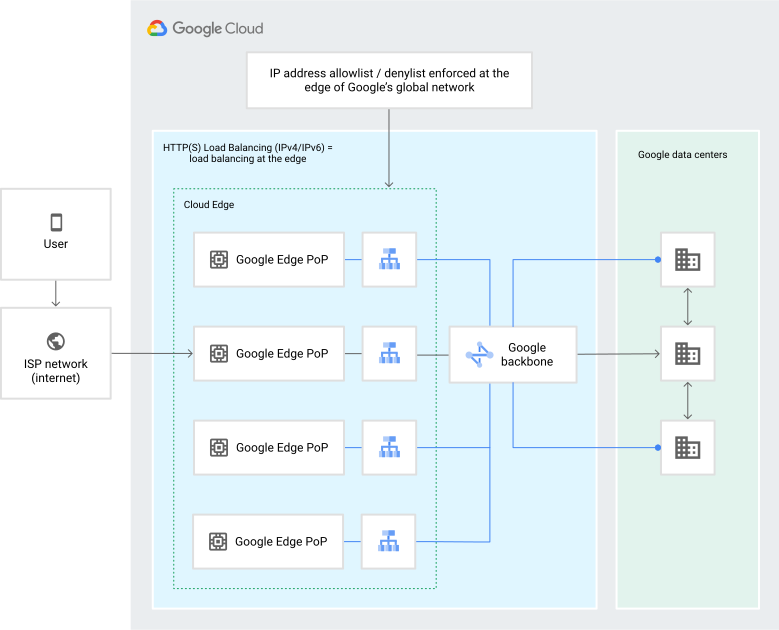](https://docs.cloud.google.com/static/armor/images/ip-bl-wl-1.svg) Cloud Armor policy at network edge (click to enlarge)
You can use some or all of these features to help protect your application. Use
security policies to match against known conditions, create WAF rules to help protect
against common attacks like those in the [OWASP Core Rule Set
4.22](https://github.com/coreruleset/coreruleset/releases/tag/v4.22.0), and use
Google Cloud Armor Enterprise built-in DDoS protections.
## What's next
- [Examine common use cases for Cloud Armor](https://docs.cloud.google.com/armor/docs/common-use-cases)
- [Learn about Cloud Armor Enterprise](https://docs.cloud.google.com/armor/docs/armor-enterprise-overview)
- [Learn about Adaptive Protection](https://docs.cloud.google.com/armor/docs/adaptive-protection-overview)