Google Cloud provides images that contain common operating systems,
frameworks, libraries, and drivers. Google Cloud optimizes these
pre-configured images to support your artificial intelligence (AI) and machine
learning (ML) workloads.
This document provides an overview of the images that you use to deploy, manage,
and run workloads in your AI Hypercomputer environment.
## Understand the image categories
Images are grouped into the following categories:
- **AI and ML frameworks and libraries** : Docker images that are pre-configured with binaries for ML frameworks and libraries to simplify the creation, training, and use of ML models. On AI Hypercomputer, you can use [Deep Learning Software Layer (DLSL)](https://docs.cloud.google.com/ai-hypercomputer/docs/images.md.txt#dlsl-container-images) Docker images to run ML models such as NeMO and MaxText on a Google Kubernetes Engine (GKE) cluster.
- **Cluster deployment and orchestration** : operating system (OS) images that you use to deploy and manage the [performance-optimized
infrastructure](https://docs.cloud.google.com/ai-hypercomputer/docs/overview) on which your AI workloads run. The image that you should use depends on which GPU infrastructure you're using (Clustered GPUs or General GPUs) and how you plan to deploy your clusters:
- [GKE node images](https://docs.cloud.google.com/ai-hypercomputer/docs/images.md.txt#gke-node-images): you can use these images to deploy GKE clusters.
- [Slurm OS images](https://docs.cloud.google.com/ai-hypercomputer/docs/images.md.txt#slurm-os-images): Cluster Toolkit builds and deploys these images, which install the necessary system software for Slurm nodes.
- [Accelerator OS images](https://docs.cloud.google.com/ai-hypercomputer/docs/images.md.txt#accelerator-os-images): you can use these images to create individual or groups of Compute Engine instances.
## AI and ML frameworks and libraries
Google Cloud provides Docker images that package popular AI and ML frameworks
and libraries. These images provide the software needed to simplify the
development, training, and deployment of models on your AI-optimized clusters
running on AI Hypercomputer.
### JAX AI images
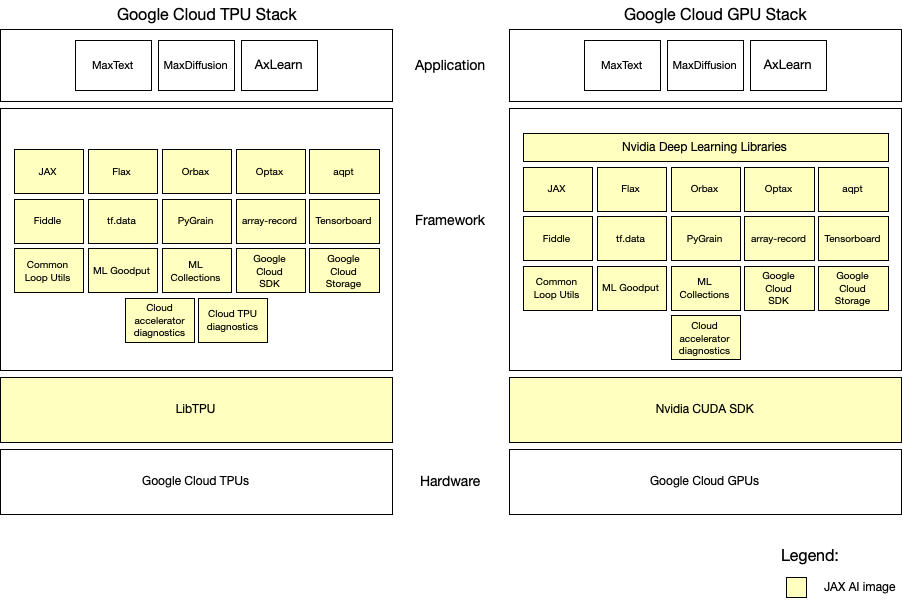
The JAX AI Images (JAII, formerly known as JAX Stable Stack Images) for
Google Cloud TPUs and GPUs offer ready-to-use Docker images that contain the
JAX framework, a curated collection of compatible libraries, and settings for
the Google Cloud infrastructure. JAX AI TPU images come pre-configured with JAX
libraries and [TPU libraries](https://pypi.org/project/libtpu/). JAX AI GPU
images come pre-configured with JAX libraries and relevant [CUDA/NVIDIA libraries](https://catalog.ngc.nvidia.com/orgs/nvidia/containers/cuda-dl-base).
#### The hardware layer
JAX AI images sit on top of the hardware layer which consists of the
accelerators (TPU or GPU) and their associated VMs. In order to use a JAX AI
image, you need to provision TPU or GPU VMs. You can do this using the TPU API,
Compute Engine API, or the GKE API.
#### The framework layer
The framework layer provides tools and libraries for building ML workloads. JAX
AI images provide a pre-configured base for JAX-based ML workloads, including
the core JAX library and other essential dependencies, to ensure a consistent
and high-performance development experience.
The LibTPU layer in the JAX AI image is specifically built and bundled with the
respective JAX version. Using a different JAX version may lead to unexpected
behavior or errors.
The CUDA layer in the JAX AI image includes components managed by NVIDIA, such
as the NGC CUDA Deep Learning Image, used as the base image of the GPU Training
Image. The GPU image also contains Transformer Engine, a custom NVIDIA library
for accelerating transformer models on NVIDIA GPUs.
Additional application-specific packages, beyond those provided in the
JAX AI image, may be required for your specific machine learning workload.
##### Libraries in JAX AI Images:
### TPU images
| **Functionality** | **Package Name** |
|---|---|
| ***Core Libraries or Components*** ||
| ML Framework | [JAX and JAX lib](https://github.com/jax-ml/jax) |
| LibTPU | [Cloud LibTPU stable Release](https://pypi.org/project/libtpu/) |
| Layer/Model Library | [Flax](https://github.com/google/flax) |
| Checkpointing | [Orbax](https://github.com/google/orbax) |
| Quantization | [Qwix](https://github.com/google/qwix) |
| Optimizers | [Optax](https://github.com/google-deepmind/optax) [aqtp](https://github.com/google/aqt) |
| Custom Kernels | [Tokamax](https://github.com/openxla/tokamax) |
| Config | [Fiddle](https://github.com/google/fiddle) |
| Input pipeline | [tf.data](https://www.tensorflow.org/guide/data) [PyGrain](https://github.com/google/grain) [array-record](https://github.com/google/array_record) |
| Profiling, debugging | [Tensorboard](https://github.com/tensorflow/tensorboard) |
| Utils | [Common loop utils](https://github.com/google/CommonLoopUtils) [ML goodput measurement](https://github.com/AI-Hypercomputer/ml-goodput-measurement) [ML collections](https://github.com/google/ml_collections) |
| ***Cloud-specific Tools*** ||
| Google Cloud | [Google Cloud SDK](https://cloud.google.com/sdk/gcloud/reference) [Google Cloud storage](https://cloud.google.com/sdk/gcloud/reference/storage) |
| Diagnostics | [Cloud Accelerator Diagnostics](https://github.com/AI-Hypercomputer/cloud-accelerator-diagnostics) [Cloud TPU Diagnostics](https://github.com/AI-Hypercomputer/cloud-tpu-monitoring-debugging) |
### GPU images
| **Functionality** | **Package Name** |
|---|---|
| ***Core Libraries or Components*** ||
| ML Framework | [JAX and JAX lib](https://github.com/jax-ml/jax) |
| NVIDIA CUDA Libraries | [CUDA DL Image](https://catalog.ngc.nvidia.com/orgs/nvidia/containers/cuda-dl-base) |
| Layer/Model Library | [Flax](https://github.com/google/flax) |
| Checkpointing | [Orbax](https://github.com/google/orbax) |
| Optimizers | [Optax](https://github.com/google-deepmind/optax) [aqtp](https://github.com/google/aqt) [TransformerEngine](https://pypi.org/project/transformer-engine/) |
| Config | [Fiddle](https://github.com/google/fiddle) |
| Input pipeline | [tf.data](https://www.tensorflow.org/guide/data) [PyGrain](https://github.com/google/grain) [array-record](https://github.com/google/array_record) |
| Profiling, debugging | [Tensorboard](https://github.com/tensorflow/tensorboard) |
| Utils | [Common loop utils](https://github.com/google/CommonLoopUtils) [ML goodput measurement](https://github.com/AI-Hypercomputer/ml-goodput-measurement) [ML collections](https://github.com/google/ml_collections) |
| ***Cloud-specific Tools*** ||
| Google Cloud | [Google Cloud SDK](https://cloud.google.com/sdk/gcloud/reference) [Google Cloud storage](https://cloud.google.com/sdk/gcloud/reference/storage) |
| Diagnostics | [Cloud Accelerator Diagnostics](https://github.com/AI-Hypercomputer/cloud-accelerator-diagnostics) |
##### Current JAX AI images
### TPU images
| JAX AI image | Release date |
|---|---|
| [JAX 0.9.0 Revision 1](https://us-docker.pkg.dev/cloud-tpu-images/jax-ai-image/tpu:jax0.9.0-rev1) | 2026-02-03 |
| [JAX 0.8.2 Revision 1](https://us-docker.pkg.dev/cloud-tpu-images/jax-ai-image/tpu:jax0.8.2-rev1) | 2026-01-14 |
| [JAX 0.8.1 Revision 1](https://us-docker.pkg.dev/cloud-tpu-images/jax-ai-image/tpu:jax0.8.1-rev1) | 2025-11-21 |
| [JAX 0.8.0 Revision 1](https://us-docker.pkg.dev/cloud-tpu-images/jax-ai-image/tpu:jax0.8.0-rev1) | 2025-10-28 |
| [JAX 0.7.2 Revision 1](https://us-docker.pkg.dev/cloud-tpu-images/jax-ai-image/tpu:jax0.7.2-rev1) | 2025-09-30 |
| [JAX 0.7.0 Revision 1](https://us-docker.pkg.dev/cloud-tpu-images/jax-ai-image/tpu:jax0.7.0-rev1) | 2025-07-29 |
| [JAX 0.6.1 Revision 1](https://us-docker.pkg.dev/cloud-tpu-images/jax-ai-image/tpu:jax0.6.1-rev1) | 2025-06-05 |
| [JAX 0.5.2 Revision 2](https://us-docker.pkg.dev/cloud-tpu-images/jax-ai-image/tpu:jax0.5.2-rev2) | 2025-04-25 |
| [JAX 0.5.2 Revision 1](https://us-docker.pkg.dev/cloud-tpu-images/jax-ai-image/tpu:jax0.5.2-rev1) | 2025-03-17 |
| [JAX 0.4.37 Revision 1](https://us-docker.pkg.dev/cloud-tpu-images/jax-ai-image/tpu:jax0.4.37-rev1) | 2024-12-12 |
| [JAX 0.4.35 Revision 1](https://us-docker.pkg.dev/cloud-tpu-images/jax-ai-image/tpu:jax0.4.35-rev1) | 2024-10-30 |
### GPU images
| JAX AI image | Release date |
|---|---|
| [JAX 0.7.2 with CUDA DL 25.06 Revision 1](https://us-central1-docker.pkg.dev/deeplearning-images/jax-ai-image/gpu:jax0.7.2-cuda_dl25.06-rev1) | 2025-09-30 |
| [JAX 0.6.1 with CUDA DL 25.03 Revision 1](https://us-central1-docker.pkg.dev/deeplearning-images/jax-ai-image/gpu:jax0.6.1-cuda_dl25.03-rev1) | 2025-06-05 |
| [JAX 0.5.1 with CUDA DL 25.02 Revision 1](https://us-central1-docker.pkg.dev/deeplearning-images/jax-ai-image/gpu:jax0.5.1-cuda_dl25.02-rev1) | 2025-03-17 |
#### The application layer
You implement your specific ML workloads in the application layer which sits on
top of the framework layer. The application layer contains your application
specific code, models, and logic, all built using the tools and libraries
provided by the framework layer.
While this image provides a robust and well-tested foundation for JAX-based AI
workloads, you may need to add application-specific dependencies. When doing so,
we recommended that you do so in a way that minimizes interference with the
pre-configured base layer, which includes JAX and its core dependencies.
Introducing application-level dependencies that override or conflict with the
existing dependencies can cause side-effects such as:
- Unexpected Behaviors: your ML workloads may exhibit different behavior than before you introduced additional dependencies to the JAX AI image.
- Performance Regressions: overriding optimized JAX-related libraries can negatively impact the performance benefits provided by the JAX AI image
- Stability Issues: conflicts between your added dependencies and the core JAX dependencies can introduce instability and runtime errors within your application.
#### Release Cadence
Initially, JAX AI images are provided quarterly with a near-term goal of a
synchronized release schedule with every JAX release. This ensures that
you can benefit from the latest features and improvements as soon as they are
available.
#### Support
Each JAX AI image release adheres to a limited-time support lifecycle. Within
this timeframe, we address specific categories of requests for modifications to
existing JAX AI images:
- Security vulnerabilities: we prioritize addressing security vulnerabilities discovered in the base images or dependencies of JAX Stable Stack Docker images. Updated images will be released to mitigate potential risks.
- Breaking changes: in the event of significant breaking changes in the underlying libraries or frameworks used by JAX AI image, Google Cloud evaluates and implements necessary updates to maintain compatibility. This may involve rebuilding Docker images with updated dependencies.
> [!NOTE]
> **Note:** JAX AI images are a curated collection of packages, each with an independent release cycle. Therefore, the concept of patched releases doesn't directly apply to the entire stack.
When a security vulnerability or bug is discovered in a library within a JAII,
we incorporate the updated library into JAII, pinning all other library versions
to maintain overall stability. This results in a new JAII revision.
Minimal change for revisions:
If a bug is found in package "X" within JAX-0.4.30-rev1, we'll update "X" to its
next release (for example, v2.0) while trying to keep all other packages
unchanged. This results in a new revision: JAX-0.4.30-rev2, which will be
released as quickly as possible.
### Deep Learning Software Layer (DLSL) Docker images
These images package NVIDIA CUDA, NCCL, an ML framework, and a model. They provide
a ready-to-use environment for deep learning workloads. These prebuilt DLSL
Docker images work seamlessly with your
GKE clusters because we test and verify these images during
internal reproducibility and regression testing.
> [!NOTE]
> **Note:** If you want to use DLSL images, you must provision an AI-optimized GKE cluster first.
DLSL Docker images provide the following benefits:
- *Preconfigured software*: DLSL Docker images replicate the setup that internal reproducibility and regression testing use. These images provide a pre-configured, tested, and optimized environment, which saves significant time and effort in installation and configuration.
- *Version management*: DLSL Docker images are frequently updated. These version updates provide the latest stable version of frameworks and drivers, and the updates also address security patches.
- *Infrastructure compatibility*: DLSL Docker images are built and tested to work seamlessly with the GPU machine types available on AI Hypercomputer.
- *Quickstart instructions* : some DLSL Docker images have accompanying [sample recipes](https://github.com/AI-Hypercomputer/gpu-recipes) that show you how to start your workloads that use the pre-configured images.
#### NeMo + PyTorch + NCCL gIB plugin
These Docker images are based on the [NVIDIA NeMo NGC
image](https://catalog.ngc.nvidia.com/orgs/nvidia/containers/nemo/tags). They
contain Google's NCCL gIB plugin and bundle all NCCL binaries required to run
workloads on each supported accelerator machine. These images also include Google Cloud
tools such as [`gcsfuse`](https://docs.cloud.google.com/storage/docs/cloud-storage-fuse/install.md.txt) and the [gcloud CLI](https://docs.cloud.google.com/sdk/gcloud.md.txt) for deploying workloads to
Google Kubernetes Engine.
| DLSL image version | Dependencies version | Machine series | Release date | End of support date | DLSL image name |
|---|---|---|---|---|---|
| `nemo25.04-gib1.0.6-A4` | - `NeMo NGC:25.04.01` - `NCCL giB plugin: 1.0.6` | A4 | July 3, 2025 | July 3, 2026 | `us-central1-docker.pkg.dev/deeplearning-images/reproducibility/pytorch-gpu-nemo-nccl:nemo25.04-gib1.0.6-A4` |
| `nemo25.04-gib1.0.6-A3U` | - `NeMo NGC:25.04.01` - `NCCL giB plugin: 1.0.6` | A3 Ultra | July 3, 2025 | July 3, 2026 | `us-central1-docker.pkg.dev/deeplearning-images/reproducibility/pytorch-gpu-nemo-nccl:nemo25.04-gib1.0.6-A3U` |
| `nemo25.02-gib1.0.5-A4` | - `NeMo NGC:25.02` - `NCCL giB plugin: 1.0.5` | A4 | March 14, 2025 | March 14, 2026 | `us-central1-docker.pkg.dev/deeplearning-images/reproducibility/pytorch-gpu-nemo-nccl:nemo25.02-gib1.0.5-A4` |
| `nemo24.07-gib1.0.2-A3U` | - `NeMo NGC:24.07` - `NCCL giB plugin: 1.0.2` | A3 Ultra | February 2, 2025 | February 2, 2026 | `us-central1-docker.pkg.dev/deeplearning-images/reproducibility/pytorch-gpu-nemo-nccl:nemo24.07-gib1.0.2-A3U` |
| `nemo24.07-gib1.0.3-A3U` | - `NeMo NGC:24.07` - `NCCL giB plugin: 1.0.3` | A3 Ultra | February 2, 2025 | February 2, 2026 | `us-central1-docker.pkg.dev/deeplearning-images/reproducibility/pytorch-gpu-nemo-nccl:nemo24.07-gib1.0.3-A3U` |
| `nemo24.12-gib1.0.3-A3U` | - `NeMo NGC:24.12` - `NCCL giB plugin: 1.0.3` | A3 Ultra | February 7, 2025 | February 7, 2026 | `us-central1-docker.pkg.dev/deeplearning-images/reproducibility/pytorch-gpu-nemo-nccl:nemo24.12-gib1.0.3-A3U` |
| `nemo24.07-tcpx1.0.5-A3Mega` | - `NeMo NGC:24.07` - `GPUDirect-TCPX: 1.0.5` | A3 Mega | March 12, 2025 | March 12, 2026 | `us-central1-docker.pkg.dev/deeplearning-images/reproducibility/pytorch-gpu-nemo-nccl:nemo24.07-tcpx1.0.5-A3Mega` |
| `nemo24.07-tcpx1.0.5-A3High` | - `NeMo NGC:24.07` - `GPUDirect-TCPX: 1.0.5` | A3 High (8 GPUs) | March 12, 2025 | March 12, 2026 | `us-central1-docker.pkg.dev/deeplearning-images/reproducibility/pytorch-gpu-nemo-nccl:nemo24.07-tcpx1.0.5-A3High` |
#### NeMo + PyTorch
This Docker image is based on the [NVIDIA NeMo NGC
image](https://catalog.ngc.nvidia.com/orgs/nvidia/containers/nemo/tags) and
includes Google Cloud tools such as
[`gcsfuse`](https://docs.cloud.google.com/storage/docs/cloud-storage-fuse/install.md.txt) and [gcloud CLI](https://docs.cloud.google.com/sdk/gcloud.md.txt) for deploying workloads to
Google Kubernetes Engine.
| DLSL image version | Dependencies version | Machine series | Release date | End of support date | DLSL image name |
|---|---|---|---|---|---|
| `nemo24.07--A3U` | `NeMo NGC:24.07` | A3 Ultra | December 19, 2024 | December 19, 2025 | `us-central1-docker.pkg.dev/deeplearning-images/reproducibility/pytorch-gpu-nemo:nemo24.07-A3U` |
| `nemo24.07-tcpx1.0.5-A3Mega` | - `NeMo NGC:24.07` - `GPUDirect-TCPX: 1.0.5` | A3 Mega | March 12, 2025 | March 12, 2026 | `us-central1-docker.pkg.dev/deeplearning-images/reproducibility/pytorch-gpu-nemo:nemo24.07-tcpx1.0.5-A3Mega` |
| `nemo24.07-tcpx1.0.5-A3High` | - `NeMo NGC:24.07` - `GPUDirect-TCPX: 1.0.5` | A3 High (8 GPUs) | March 12, 2025 | March 12, 2026 | `us-central1-docker.pkg.dev/deeplearning-images/reproducibility/pytorch-gpu-nemo:nemo24.07-tcpx1.0.5-A3High` |
#### MaxText + JAX toolbox
This Docker image is based on the [NVIDIA JAX toolbox
image](https://github.com/nvidia/JAX-Toolbox/pkgs/container/jax) and includes
Google Cloud tools such as
[`gcsfuse`](https://docs.cloud.google.com/storage/docs/cloud-storage-fuse/install.md.txt) and [gcloud CLI](https://docs.cloud.google.com/sdk/gcloud.md.txt) for deploying workloads to
Google Kubernetes Engine.
| DLSL image version | Dependencies version | Machine series | Release date | End of support date | DLSL image name |
|---|---|---|---|---|---|
| `toolbox-maxtext-2025-01-10-A3U` | `JAX toolbox: maxtext-2025-01-10` | A3 Ultra | March 11, 2025 | March 11, 2026 | `us-central1-docker.pkg.dev/deeplearning-images/reproducibility/jax-maxtext-gpu:toolbox-maxtext-2025-01-10-A3U` |
| `jax0.5.1-cu12-A3Mega` | - `JAX: 0.5.1` - `CUDA: 12.x` - `MaxText: Latest` | A3 Mega | March 17, 2025 | March 17, 2026 | `us-central1-docker.pkg.dev/deeplearning-images/reproducibility/jax-gpu-maxtext:jax0.5.1-cu12-A3Mega` |
| `jax0.5.1-cu12-A3High` | - `JAX: 0.5.1` - `CUDA: 12.x` - `MaxText: Latest` | A3 High (8 GPUs) | March 17, 2025 | March 17, 2026 | `us-central1-docker.pkg.dev/deeplearning-images/reproducibility/jax-gpu-maxtext:jax0.5.1-cu12-A3High` |
#### MaxText + JAX stable stack
This Docker image is based on the
[JAX stable stack](https://console.cloud.google.com/artifacts/docker/deeplearning-images/us-central1/jax-stable-stack?e=13802955&inv=1&invt=AbsC4A&mods=monitoring_api_prod&project=deeplearning-images)
and [MaxText](https://github.com/AI-Hypercomputer/maxtext). This image also
includes dependencies such as `dnsutils` for running workloads on
Google Kubernetes Engine.
| DLSL image version | Dependencies version | Machine series | Release date | End of support date | DLSL image name |
|---|---|---|---|---|---|
| `jax-maxtext-gpu:jax0.5.1-cuda_dl25.02-rev1-maxtext-20150317` | - `JAX Stable stacks:jax0.5.1-cuda_dl25.02-rev1` - maxtext commit: `54e98c9e62caa426cf5902be068533ddb4fb79f5` | A4 | March 17, 2025 | March 17, 2026 | `us-central1-docker.pkg.dev/deeplearning-images/reproducibility/jax-maxtext-gpu:jax0.5.1-cuda_dl25.02-rev1-maxtext-20150317` |
## Cluster deployment and orchestration
OS images include all the necessary software components to deploy an operating
system on a compute instance or GKE node. The operating system
manages underlying hardware resources, such as accelerators and networking.
This provides the compute resources for your AI workload.
### GKE node images
GKE deploys clusters using node images. These node images are
available for various operating systems such as Container-Optimized OS,
Ubuntu, and Windows Server. The
[Container-Optimized OS with containerd (cos_containerd)](https://docs.cloud.google.com/kubernetes-engine/docs/concepts/node-images.md.txt#cos-variants)
node images that you need to deploy GKE Autopilot
clusters include optimizations to support your AI and ML workloads.
For more information about these node images, see
[Node images](https://docs.cloud.google.com/kubernetes-engine/docs/concepts/node-images.md.txt).
### Slurm OS images
Slurm clusters deploy compute and controller nodes as compute instances
on Compute Engine.
To provision AI-optimized Slurm clusters, you must use
[Cluster Toolkit](https://docs.cloud.google.com/cluster-toolkit/docs/overview.md.txt).
By default, the cluster blueprints for A4X, A4, and A3 Ultra clusters
deploy compute instances that use prebuilt
[Advanced Compute Images](https://docs.cloud.google.com/compute/docs/images/workload/aci-images.md.txt).
For other machine series, or when building [Slurm custom images](https://docs.cloud.google.com/ai-hypercomputer/docs/images.md.txt#slurm-images),
the cluster blueprint automatically builds a custom OS image during deployment
that installs the required system software for cluster and workload management
on the Slurm nodes. You can modify the default blueprints before you deploy
them to customize the software that your images include.
The following section summarizes the software that the cluster blueprint
installs on your A4, A3 Ultra, A3 Mega, and A3 High (8 GPUs) Slurm nodes.
Cluster blueprints extend the
[Ubuntu LTS accelerator OS images](https://docs.cloud.google.com/ai-hypercomputer/docs/images.md.txt#ubuntu-lts-accelerator).
### A4X Max
The [A4X Max
blueprint](https://github.com/GoogleCloudPlatform/cluster-toolkit/blob/main/examples/machine-learning/a4x-maxgpu-4g-metal/a4xmax-bm-slurm-blueprint.yaml) available on GitHub includes the following software by default:
- Ubuntu 24.04 LTS
- Slurm: version 25.05.2
- The following Slurm dependencies:
- `munge`
- `mariadb`
- `libjwt`
- `lmod`
- [Open MPI](https://github.com/open-mpi/ompi): version 5.0.x
- NFS client and server
- NVIDIA 580 series drivers
- NVIDIA Enroot
- [NVIDIA Pyxis](https://github.com/NVIDIA/pyxis/)
- The following NVIDIA tools:
- Data Center GPU Manager (`dcgmi`)
- `nvidia-container-toolkit`: version 1.17.7
- `nvidia-imex`
- `nvidia-fabricmanager`
- CUDA Toolkit: version 13.0
- NCCL Plugin for A4X Max (`nccl-gib-a4x-max-arm64`)
- DOCA-OFED driver
- [Ops Agent](https://docs.cloud.google.com/stackdriver/docs/solutions/agents/ops-agent.md.txt)
- [Cloud Storage FUSE](https://docs.cloud.google.com/storage/docs/cloud-storage-fuse/overview.md.txt)
### A4X
The [A4X
blueprint](https://github.com/GoogleCloudPlatform/cluster-toolkit/blob/main/examples/machine-learning/a4x-highgpu-4g/a4xhigh-slurm-blueprint.yaml)
available on GitHub uses prebuilt
[Advanced Compute Images](https://docs.cloud.google.com/compute/docs/images/workload/aci-images.md.txt) by default. The
`aci-gpu-u2404-slurm-2511-cuda-130-nvidia-580-arm64` image family includes
the following software and configuration by default:
- Ubuntu 24.04 LTS (Arm64)
- Slurm: version 25.11 and all dependent packages
- NVIDIA 580 series drivers
- CUDA Toolkit: version 13.0
- NVIDIA Container Toolkit, Enroot, and Pyxis
- Data Center GPU Manager (`dcgmi`) and Fabric Manager
- [NCCL/gIB plugin](https://docs.cloud.google.com/ai-hypercomputer/docs/nccl/overview.md.txt)
- [Ops Agent](https://docs.cloud.google.com/stackdriver/docs/solutions/agents/ops-agent.md.txt)
- [Cloud Storage FUSE](https://docs.cloud.google.com/storage/docs/cloud-storage-fuse/overview.md.txt)
To view the complete list of preinstalled tools and manifest details, see
[Overview of Advanced Compute Images](https://docs.cloud.google.com/compute/docs/images/workload/aci-images.md.txt).
### A4
The [A4
blueprint](https://github.com/GoogleCloudPlatform/cluster-toolkit/blob/main/examples/machine-learning/a4-highgpu-8g/a4high-slurm-blueprint.yaml)
available on GitHub uses prebuilt
[Advanced Compute Images](https://docs.cloud.google.com/compute/docs/images/workload/aci-images.md.txt)
by default. The `aci-gpu-u2404-slurm-2511-cuda-130-nvidia-580-amd64` image
family includes the following software and configuration by default:
- Ubuntu 24.04 LTS (x86_64)
- Slurm: version 25.11 and all dependent packages
- NVIDIA 580 series drivers
- CUDA Toolkit: version 13.0
- NVIDIA Container Toolkit, Enroot, and Pyxis
- Data Center GPU Manager (`dcgmi`) and Fabric Manager
- [NCCL/gIB plugin](https://docs.cloud.google.com/ai-hypercomputer/docs/nccl/overview.md.txt)
- Infiniband and multi-queue networking support
- [Ops Agent](https://docs.cloud.google.com/stackdriver/docs/solutions/agents/ops-agent.md.txt)
- [Cloud Storage FUSE](https://docs.cloud.google.com/storage/docs/cloud-storage-fuse/overview.md.txt)
To view the complete list of preinstalled tools and manifest details, see
[Overview of Advanced Compute Images](https://docs.cloud.google.com/compute/docs/images/workload/aci-images.md.txt).
### A3 Ultra
The [A3 Ultra
blueprint](https://github.com/GoogleCloudPlatform/cluster-toolkit/blob/main/examples/machine-learning/a3-ultragpu-8g/a3ultra-slurm-blueprint.yaml)
available on GitHub uses prebuilt
[Advanced Compute Images](https://docs.cloud.google.com/compute/docs/images/workload/aci-images.md.txt)
by default. The `aci-gpu-u2404-slurm-2511-cuda-130-nvidia-580-amd64` image
family includes the following software and configuration by default:
- Ubuntu 24.04 LTS (x86_64)
- Slurm: version 25.11 and all dependent packages
- NVIDIA 580 series drivers
- CUDA Toolkit: version 13.0
- NVIDIA Container Toolkit, Enroot, and Pyxis
- Data Center GPU Manager (`dcgmi`) and Fabric Manager
- [NCCL/gIB plugin](https://docs.cloud.google.com/ai-hypercomputer/docs/nccl/overview.md.txt)
- Infiniband and multi-queue networking support
- [Ops Agent](https://docs.cloud.google.com/stackdriver/docs/solutions/agents/ops-agent.md.txt)
- [Cloud Storage FUSE](https://docs.cloud.google.com/storage/docs/cloud-storage-fuse/overview.md.txt)
To view the complete list of preinstalled tools and manifest details, see
[Overview of Advanced Compute Images](https://docs.cloud.google.com/compute/docs/images/workload/aci-images.md.txt).
### A3 Mega
The [A3 Mega
blueprint](https://github.com/GoogleCloudPlatform/cluster-toolkit/blob/main/examples/machine-learning/a3-megagpu-8g/a3mega-slurm-blueprint.yaml)
available on GitHub includes the following software by default:
- Ubuntu 22.04 LTS
- Slurm: version 24.11.2
- The following Slurm dependencies:
- `munge`
- `mariadb`
- `libjwt`
- `lmod`
- [Open MPI](https://github.com/open-mpi/ompi): the latest release of 4.1.x
- [PMIx](https://github.com/openpmix/openpmix): version 4.2.9
- NFS client and server
- NVIDIA 550 series drivers
- [NVIDIA enroot container
runtime](https://github.com/NVIDIA/enroot/commit/09ae4b2c18a18ed5ab34b7697006aa18697c4cec): version 3.4.1
- [NVIDIA pyxis](https://github.com/NVIDIA/pyxis/)
- The following NVIDIA tools:
- Data Center GPU Manager (`dcgmi`)
- `libnvidia-cfg1-550-server`
- `libnvidia-nscq-550`
- `nvidia-compute-utils-550-server`
- `nsight-compute`
- `nsight-systems`
- CUDA Toolkit: version 12.4
- Infiniband support, including `ibverbs-utils`
- TCPXO for A3 Mega: specific installer for NCCL TCPXO and the 1.6 Tbps network stack
- [Ops Agent](https://docs.cloud.google.com/stackdriver/docs/solutions/agents/ops-agent.md.txt)
- [Cloud Storage FUSE](https://docs.cloud.google.com/storage/docs/cloud-storage-fuse/overview.md.txt)
### A3 High (8 GPUs)
The [A3 High (8 GPUs) blueprint](https://github.com/GoogleCloudPlatform/cluster-toolkit/blob/main/examples/machine-learning/a3-highgpu-8g/a3high-slurm-blueprint.yaml) available on GitHub includes the following software by default:
- Ubuntu 22.04 LTS
- Slurm: version 24.11.2
- The following Slurm dependencies:
- `munge`
- `mariadb`
- `libjwt`
- `lmod`
- [Open MPI](https://github.com/open-mpi/ompi): the latest release of 4.1.x
- [PMIx](https://github.com/openpmix/openpmix): version 4.2.9
- NFS client and server
- NVIDIA 535 or 550 series drivers
- [NVIDIA enroot container
runtime](https://github.com/NVIDIA/enroot/commit/09ae4b2c18a18ed5ab34b7697006aa18697c4cec): version 3.4.1
- [NVIDIA pyxis](https://github.com/NVIDIA/pyxis/)
- The following NVIDIA tools:
- Data Center GPU Manager (`dcgmi`)
- `libnvidia-cfg1-535/550-server`
- `libnvidia-nscq-535/550`
- `nvidia-compute-utils-535/550-server`
- `nsight-compute`
- `nsight-systems`
- CUDA Toolkit: version 12.2 or 12.4
- Infiniband support, including `ibverbs-utils`
- TCPX for A3 High (8 GPUs): specific installer for NCCL TCPX (GPUDirect-TCPX) and the 800 Gbps network stack (4 NICs)
- [Ops Agent](https://docs.cloud.google.com/stackdriver/docs/solutions/agents/ops-agent.md.txt)
- [Cloud Storage FUSE](https://docs.cloud.google.com/storage/docs/cloud-storage-fuse/overview.md.txt)
### Accelerator OS images
AI Hypercomputer lets you provision individual compute instances or groups of compute instances.
If you want to create these instances, you must specify an OS image during
instance creation.
Google Cloud offers a suite of
[OS images](https://docs.cloud.google.com/compute/docs/images/os-details.md.txt#gpu-support) for
instance creation. Google Cloud also offers a specialized set of accelerator
OS images for AI-optimized instances. These accelerator OS images include core
drivers for GPU and networking functionality, such as NVIDIA drivers, Mellanox
drivers, and their dependencies.
For more information about each OS, see the
[Operating system details](https://docs.cloud.google.com/compute/docs/images/os-details.md.txt) page in the
Compute Engine documentation.
Accelerator OS images are available for the Rocky Linux and Ubuntu LTS operating
systems.
#### Rocky Linux accelerator
The following
[Rocky Linux accelerator](https://docs.cloud.google.com/compute/docs/images/os-details.md.txt#rocky_linux) OS images
are available for each machine series:
| Infrastructure | Image family | Architecture | Machine series | Image project |
|---|---|---|---|---|
| **Clustered GPU** | `rocky-linux-10-optimized-gcp-nvidia-580` | x86 | A4, A3 Ultra | `rocky-linux-accelerator-cloud` |
| **Clustered GPU** | `rocky-linux-10-optimized-gcp-nvidia-580-arm64` | Arm | A4X | `rocky-linux-accelerator-cloud` |
| **Clustered GPU** | `rocky-linux-9-optimized-gcp-nvidia-580` | x86 | A4, A3 Ultra | `rocky-linux-accelerator-cloud` |
| **Clustered GPU** | `rocky-linux-9-optimized-gcp-nvidia-580-arm64` | Arm | A4X | `rocky-linux-accelerator-cloud` |
| **Clustered GPU** | `rocky-linux-8-optimized-gcp-nvidia-580` | x86 | A4, A3 Ultra | `rocky-linux-accelerator-cloud` |
| **Clustered GPU** | `rocky-linux-8-optimized-gcp-nvidia-580-arm64` | Arm | A4X | `rocky-linux-accelerator-cloud` |
#### Ubuntu LTS accelerator
The following
[Ubuntu LTS accelerator](https://docs.cloud.google.com/compute/docs/images/os-details.md.txt#ubuntu_lts)
OS images are available for each machine series:
| Infrastructure | Image family | Architecture | Machine series | Image project |
|---|---|---|---|---|
| **Clustered GPU** | `ubuntu-accelerator-2404-arm64-with-nvidia-580` | Arm | A4X | `ubuntu-os-accelerator-images` |
| **Clustered GPU** | `ubuntu-accelerator-2404-amd64-with-nvidia-580` | x86 | A4, A3 Ultra | `ubuntu-os-accelerator-images` |
| **Clustered GPU** | `ubuntu-accelerator-2204-arm64-with-nvidia-580` | Arm | A4X | `ubuntu-os-accelerator-images` |
| **Clustered GPU** | `ubuntu-accelerator-2204-amd64-with-nvidia-580` | x86 | A4, A3 Ultra | `ubuntu-os-accelerator-images` |
## What's next
- To learn how to acquire capacity for your chosen image, see [Consumption options](https://docs.cloud.google.com/ai-hypercomputer/docs/consumption-models.md.txt).
- To review the process and choices to make when you start a cluster, see [Plan and create your AI infrastructure](https://docs.cloud.google.com/ai-hypercomputer/docs/process-overview.md.txt).